- 產品與解決方案
- 行業解決方案
- 服務
- 支持
- 合作夥伴
- 關於我們



78-MSR係列路由器與Cisco設備BFD互通的配置舉例
本章節下載: 78-MSR係列路由器與Cisco設備BFD互通的配置舉例 (153.6 KB)
MSR係列路由器與Cisco設備BFD互通的配置舉例
|
Copyright © 2014 杭州華三通信技術有限公司 版權所有,保留一切權利。 非經本公司書麵許可,任何單位和個人不得擅自摘抄、複製本文檔內容的部分或全部, 並不得以任何形式傳播。本文檔中的信息可能變動,恕不另行通知。 |
|
目 錄
本文主要介紹MSR與Cisco設備BFD互通配置。
本文檔不嚴格與具體軟、硬件版本對應,如果使用過程中與產品實際情況有差異,請參考相關產品手冊,或以設備實際情況為準。
本文檔中的配置均是在實驗室環境下進行的配置和驗證,配置前設備的所有參數均采用出廠時的缺省配置。如果您已經對設備進行了配置,為了保證配置效果,請確認現有配置和以下舉例中的配置不衝突。
本文檔假設您已了解BFD、OSPF和BGP特性。
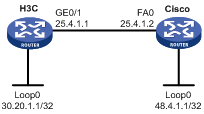
MSR與Cisco設備之間運行OSPF路由協議,並使能OSPF與BFD聯動,當BFD檢測到鏈路故障時,本地OSPF進程將中斷與對端的OSPF鄰居關係。
圖1 BFD聯動配置組網圖
為了使能BFD,配置OSPF與BFD聯動,並根據實際需要配置BFD參數。
H3C版本:
本舉例是在Release 2207P14版本上進行配置和驗證的。
CISCO版本:
本舉例是在RELEASE SOFTWARE (fc2)版本上進行配置和驗證的。
· 配置BFD建立會話時必須至少有一方的會話模式初始化設置為主動模式。缺省情況下,MSR設備的會話模式初始工作在主動模式。
· 通過控製方式建立BFD會話時,注意兩端的參數設置是否適配:MSR設備工作在控製方式時,可以配置發送BFD控製報文的最小時間間隔的最小值為200ms,可以配置的接收BFD控製報文的最小時間間隔的最小值為200ms;而Cisco 這兩個時間間隔最小值可以配置為50ms。
# 配置Loopback接口及接口地址。
<H3C> system-view
[H3C] interface LoopBack0
[H3C-LoopBack0] ip address 30.20.1.1 255.255.255.255
[H3C-LoopBack0] quit
# 配置與Cisco相連的接口GE0/1的IP地址和描述信息。
[H3C] interface GigabitEthernet0/1
[H3C-GigabitEthernet0/1] description to-cisco
[H3C-GigabitEthernet0/1] ip address 25.4.1.1 255.255.255.0
[H3C-GigabitEthernet0/1] quit
# 配置OSPF,並使能Loopback接口和GE0/1接口所在網段。
[H3C] ospf 1
[H3C-ospf-1] area 0.0.0.0
[H3C-ospf-1-area-0.0.0.0] network 25.4.1.0 0.0.0.255
[H3C-ospf-1-area-0.0.0.0] network 30.20.1.1 0.0.0.0
[H3C-ospf-1-area-0.0.0.0] quit
[H3C-ospf-1] quit
# 在G0/1接口下配置OSPF和BFD聯動。
[H3C] interface GigabitEthernet0/1
[H3C-GigabitEthernet0/1] ospf bfd enable
# 在G0/1接口下配置發送BFD控製報文的最小時間間隔為200ms。
[H3C-GigabitEthernet0/1] bfd min-transmit-interval 200
# 在G0/1接口下配置接收BFD控製報文的最小時間間隔為200ms。
[H3C-GigabitEthernet0/1] bfd min-receive-interval 200
# 在G0/1接口下配置檢測時間倍數。
[H3C-GigabitEthernet0/1] bfd detect-multiplier 3
說明:這裏配置接收和發送BFD控製報文的間隔為200ms,檢測時間倍數為3;實際應用時可以根據需要進行相應的參數配置。
# 配置接口和相關接口的IP地址
cisco#configure terminal
cisco(config)# interface LoopBack0
cisco(config-if)#ip address 48.4.1.1 255.255.255.255
cisco(config-if)#interface fastethernet0
cisco(config-if)#ip address 25.4.1.2 255.255.255.0
cisco(config-if)#exit
# 配置OSPF路由協議,並使能Loopback0和fastethernet0所在的網段
cisco(config)#router ospf 1
cisco(config-router)#network 25.4.1.0 0.0.0.255 area 0
cisco(config-router)#network 48.4.1.0 0.0.0.255 area 0
cisco(config-if)#exit
# 使能IP CEF 功能:
cisco(config)#ip cef
# 在接口fastethernet0下使能OSPF與BFD聯動,並配置BFD的發送間隔為200ms,最小接收間隔為200ms,檢測時間倍數為3
cisco(config)#interface fastethernet 0
cisco(config-if)#ip ospf bfd
cisco(config-if)#bfd interval 200 min_rx 200 multiplier 3
(1) 在鏈路正常的情況下,可以看到MSR與Cisco之間建立了BFD的session,session的狀態為up,session應用的協議類型為OSPF。
[H3C] display bfd session
Total Session Num: 1 Init Mode: Active
IPv4 Session Working Under Ctrl Mode:
LD/RD SourceAddr DestAddr State Holdtime Interface
51/2 25.4.1.1 25.4.1.2 Up 600ms GE0/1
[H3C] display bfd session verbose
Total Session Num: 1 Init Mode: Active
IPv4 Session Working Under Ctrl Mode:
Local Discr: 51 Remote Discr: 2
Source IP: 25.4.1.1 Destination IP: 25.4.1.2
Session State: Up Interface: GigabitEthernet0/1
Min Trans Inter: 200ms Act Trans Inter: 200ms
Min Recv Inter: 200ms Act Detect Inter: 600ms
Recv Pkt Num: 2002 Send Pkt Num: 6637
Hold Time: 500ms Connect Type: Direct
Running Up for: 00:05:56 Auth mode: None
Protocol: OSPF
Diag Info: No Diagnostic
(2) MSR與Cisco可以互相學習到對端Loopback的網段地址
H3C側:
[H3C] display ip routing-table
Routing Tables: Public
Destinations : 6 Routes : 6
Destination/Mask Proto Pre Cost NextHop Interface
25.4.1.0/24 Direct 0 0 25.4.1.1 GE0/1
25.4.1.1/32 Direct 0 0 127.0.0.1 InLoop0
30.20.1.1/32 Direct 0 0 127.0.0.1 InLoop0
48.4.1.1/32 OSPF 10 2 25.4.1.2 GE0/1
127.0.0.0/8 Direct 0 0 127.0.0.1 InLoop0
127.0.0.1/32 Direct 0 0 127.0.0.1 InLoop0
Cisco側:
cisco#show ip route
Codes: L - local, C - connected, S - static, R - RIP, M - mobile, B - BGP
D - EIGRP, EX - EIGRP external, O - OSPF, IA - OSPF inter area
N1 - OSPF NSSA external type 1, N2 - OSPF NSSA external type 2
E1 - OSPF external type 1, E2 - OSPF external type 2
i - IS-IS, su - IS-IS summary, L1 - IS-IS level-1, L2 - IS-IS level-2
ia - IS-IS inter area, * - candidate default, U - per-user static route
o - ODR, P - periodic downloaded static route, + - replicated route
Gateway of last resort is not set
25.0.0.0/8 is variably subnetted, 2 subnets, 2 masks
C 25.4.1.0/24 is directly connected, FastEthernet0
L 25.4.1.2/32 is directly connected, FastEthernet0
30.0.0.0/32 is subnetted, 1 subnets
O 30.20.1.1 [110/1] via 25.4.1.1, 00:01:46, FastEthernet0
48.0.0.0/32 is subnetted, 1 subnets
C 48.4.1.1 is directly connected, Loopback0
· H3C
#
interface LoopBack0
ip address 30.20.1.1 255.255.255.255
#
interface GigabitEthernet0/1
port link-mode route
description to-cisco
ip address 25.4.1.1 255.255.255.0
ospf bfd enable
bfd min-transmit-interval 200
bfd min-receive-interval 200
bfd detect-multiplier 3
#
ospf 1
area 0.0.0.0
network 25.4.1.0 0.0.0.255
network 30.20.1.1 0.0.0.0
#
· CISCO
interface Loopback0
ip address 48.4.1.1 255.255.255.255
!
interface FastEthernet 0
ip address 25.4.1.2 255.255.255.0
ip ospf bfd
bfd interval 200 min_rx 200 multiplier 3!
!
ip cef
!
router ospf 1
log-adjacency-changes
network 25.4.1.0 0.0.0.255 area 0
network 48.4.1.0 0.0.0.255 area 0
!
組網圖如圖1,MSR與Cisco設備之間運行BGP路由協議,並使能BGP與BFD聯動,當BFD檢測到鏈路故障時,本地BGP進程將中斷與對端的BGP鄰居關係。
為了使能BFD,配置BGP與BFD聯動,並根據實際需要配置BFD參數。
本舉例是在Release 2207P14版本上進行配置和驗證的。
· BFD建立會話時必須至少有一方的會話模式初始化設置為主動模式。缺省情況下,MSR設備的會話模式初始工作在主動模式。
· 通過控製方式建立BFD會話時,注意兩端的參數設置是否適配:MSR設備工作在控製方式時,可以配置發送BFD控製報文的最小時間間隔的最小值為200ms,可以配置的接收BFD控製報文的最小時間間隔的最小值為200ms;而Cisco 這兩個時間間隔最小值可以配置為50ms。
· Cisco 12.4及12.4以後的版本才支持BFD與BGP聯動,版本較低的Cisco設備可能無法在接口上啟動BFD。
# 配置與Cisco相連的接口的IP地址和描述信息。
<H3C> system-view
[H3C] interface GigabitEthernet0/1
[H3C-GigabitEthernet0/1] description to-cisco
[H3C-GigabitEthernet0/1] ip address 25.4.1.1 255.255.255.0
[H3C-GigabitEthernet0/1] quit
# 配置BGP。
[H3C] bgp 100
[H3C-bgp] peer 25.4.1.2 as-number 100
# 配置BGP和BFD聯動。
[H3C-bgp] peer 25.4.1.2 bfd
[H3C-bgp] quit
# 在GE0/1接口下配置發送和接收BFD控製報文的最小時間間隔為200ms。
[H3C] interface GigabitEthernet 0/1
[H3C-GigabitEthernet0/1] bfd min-transmit-interval 200
# 在GE0/1接口下配置檢測時間倍數。
[H3C-GigabitEthernet0/1] bfd detect-multiplier 3
# 配置接口和相關接口的IP地址
cisco#configure terminal
cisco(config-if)#interface FastEthernet 0
cisco(config-if)#ip address 25.4.1.2 255.255.255.0
# 配置BGP路由協議,並配置BGP的鄰居
cisco#configure terminal
cisco(config)#router bgp 100
cisco(config-router)#neighbor 25.4.1.1 remote-as 100
# 配置BGP與BFD聯動
cisco(config-router)#neighbor 25.4.1.1 fall-over bfd
# 使能IP CEF
cisco(config)#ip cef
# 在接口F0下使能BFD,並配置BFD的發送間隔為200ms,最小接收將為200ms,檢測時間倍數為3
cisco(config)#interface FastEthernet 0
cisco(config-if)#bfd interval 200 min_rx 200 multiplier 3
(1) 在鏈路正常的情況下,可以看到MSR與Cisco之間建立了bfd的session,session的狀態為up,session應用的協議類型為BGP,BGP鄰居狀態為Established.
H3C設備側:
[H3C] display bfd session
Total Session Num: 1 Init Mode: Active
IPv4 Session Working Under Ctrl Mode:
LD/RD SourceAddr DestAddr State Holdtime Interface
51/1 25.4.1.1 25.4.1.2 Up 600ms GE0/1
[H3C] display bfd session verbose
Total Session Num: 1 Init Mode: Active
IPv4 Session Working Under Ctrl Mode:
Local Discr: 51 Remote Discr: 1
Source IP: 25.4.1.1 Destination IP: 25.4.1.2
Session State: Up Interface: GigabitEthernet0/1
Min Trans Inter: 200ms Act Trans Inter: 200ms
Min Recv Inter: 200ms Act Detect Inter: 600ms
Recv Pkt Num: 13499 Send Pkt Num: 12593
Hold Time: 400ms Connect Type: Direct
Running Up for: 00:40:01 Auth mode: None
Protocol: BGP
Diag Info: No Diagnostic
[H3C] display bgp peer
BGP local router ID : 25.4.1.1
Local AS number : 100
Total number of peers : 1 Peers in established state : 1
Peer AS MsgRcvd MsgSent OutQ PrefRcv Up/Down State
25.4.1.2 100 51 43 0 0 00:42:38 Established
CISCO設備側:
看到BFD鄰居狀態為UP ,BFD與BGP 聯動,BGP鄰居狀態為Established。
查看BFD鄰居信息:
cisco#show bfd neighbors
NeighAddr LD/RD RH/RS State Int
25.4.1.1 1/51 Up Up Fa0
cisco#show bfd neighbors client bgp
NeighAddr LD/RD RH/RS State Int
25.4.1.1 1/51 Up Up Fa0
(2) 查看BFD鄰居的詳細信息
可以看到BFD與BGP協議聯動
cisco#show bfd neighbors details
NeighAddr LD/RD RH/RS State Int
25.4.1.1 1/51 Up Up Fa0
Session state is UP and not using echo function.
OurAddr: 25.4.1.2
Local Diag: 0, Demand mode: 0, Poll bit: 0
MinTxInt: 200000, MinRxInt: 200000, Multiplier: 3
Received MinRxInt: 200000, Received Multiplier: 3
Holddown (hits): 416(0), Hello (hits): 200(14561)
Rx Count: 12951, Rx Interval (ms) min/max/avg: 176/300/200 last: 184 ms ago
Tx Count: 14562, Tx Interval (ms) min/max/avg: 152/300/177 last: 148 ms ago
Elapsed time watermarks: 0 0 (last: 0)
Registered protocols: BGP
Uptime: 00:43:10
Last packet: Version: 1 - Diagnostic: 0
State bit: Up - Demand bit: 0
Poll bit: 0 - Final bit: 0
Multiplier: 3 - Length: 24
My Discr.: 51 - Your Discr.: 1
Min tx interval: 200000 - Min rx interval: 200000
Min Echo interval: 0
(3) 查看BGP的鄰居狀態
可以看到BGP與BFD聯動,BGP的鄰居狀態為Established。
cisco# show bgp all neighbors 25.4.1.1
For address family: IPv4 Unicast
BGP neighbor is 25.4.1.1, remote AS 100, internal link
Fall over configured for session
BFD is configured. Using BFD to detect fast fallover
BGP version 4, remote router ID 25.4.1.1
BGP state = Established, up for 01:00:24
Last read 00:00:25, last write 00:00:28, hold time is 180, keepalive interval
is 60 seconds
Neighbor sessions:
1 active, is not multisession capable
Neighbor capabilities:
Route refresh: advertised and received(new)
Four-octets ASN Capability: advertised and received
Address family IPv4 Unicast: advertised and received
Multisession Capability: advertised
Message statistics:
InQ depth is 0
OutQ depth is 0
Sent Rcvd
Opens: 1 1
Notifications: 0 0
Updates: 1 0
Keepalives: 69 60
Route Refresh: 0 0
Total: 71 61
Default minimum time between advertisement runs is 0 seconds
Address tracking is enabled, the RIB does have a route to 25.4.1.1
Connections established 2; dropped 1
Last reset 03:28:18, due to Peer closed the session
Transport(tcp) path-mtu-discovery is enabled
Graceful-Restart is disabled
Connection state is ESTAB, I/O status: 1, unread input bytes: 0
Connection is ECN Disabled, Mininum incoming TTL 0, Outgoing TTL 255
Local host: 25.4.1.2, Local port: 179
Foreign host: 25.4.1.1, Foreign port: 4452
Connection tableid (VRF): 0
Maximum output segment queue size: 50
Enqueued packets for retransmit: 0, input: 0 mis-ordered: 0 (0 bytes)
Event Timers (current time is 0x3D4FF184):
Timer Starts Wakeups Next
Retrans 70 0 0x0
TimeWait 0 0 0x0
AckHold 61 58 0x0
SendWnd 0 0 0x0
KeepAlive 0 0 0x0
GiveUp 0 0 0x0
PmtuAger 0 0 0x0
DeadWait 0 0 0x0
Linger 0 0 0x0
ProcessQ 0 0 0x0
iss: 3824353515 snduna: 3824354908 sndnxt: 3824354908 sndwnd: 8192
irs: 1119181122 rcvnxt: 1119182308 rcvwnd: 15199 delrcvwnd: 1185
SRTT: 300 ms, RTTO: 303 ms, RTV: 3 ms, KRTT: 0 ms
minRTT: 0 ms, maxRTT: 300 ms, ACK hold: 200 ms
Status Flags: passive open, gen tcbs
Option Flags: nagle, path mtu capable
IP Precedence value : 6
Datagrams (max data segment is 1460 bytes):
Rcvd: 477 (out of order: 0), with data: 61, total data bytes: 1185
Sent: 476 (retransmit: 0, fastretransmit: 0, partialack: 0, Second Congestion: 0
), with data: 71, total data bytes: 1392
Packets received in fast path: 0, fast processed: 0, slow path: 0
fast lock acquisition failures: 0, slow path: 0
For address family: VPNv4 Unicast
For address family: IPv4 Multicast
· H3C
#
interface GigabitEthernet0/1
port link-mode route
ip address 25.4.1.1 255.255.255.0
bfd min-transmit-interval 200
bfd min-receive-interval 200
bfd detect-multiplier 3
#
bgp 100
undo synchronization
peer 25.4.1.2 as-number 100
peer 25.4.1.2 bfd
#
· CISCO
!
interface FastEthernet 0
ip address 25.4.1.2 255.255.255.0
bfd interval 200 min_rx 200 multiplier 3
!
ip cef
!
router bgp 100
neighbor 25.4.1.1 remote-as 100
neighbor 25.4.1.1 fall-over bfd
!
· H3C MSR 係列路由器 命令參考(V5)-R2311
· H3C MSR 係列路由器 配置指導(V5)-R2311
不同款型規格的資料略有差異, 詳細信息請向具體銷售和400谘詢。H3C保留在沒有任何通知或提示的情況下對資料內容進行修改的權利!







 支持
支持