• 產品與解決方案
  • 行業解決方案
  • 服務
  • 支持
  • 合作夥伴
  • 關於我們

H3C MSR係列路由器典型配置舉例(V5)-6W100

目錄

43-MSR係列路由器PPPoE + L2TP功能的配置舉例

本章節下載 43-MSR係列路由器PPPoE + L2TP功能的配置舉例  (126.46 KB)

43-MSR係列路由器PPPoE + L2TP功能的配置舉例

MSR係列路由器PPPoE+L2TP功能配置舉例


H3C_彩色.emf


1  簡介

本文檔介紹MSR路由器PPPoE+L2TP功能配置。

2  配置前提

本文檔不嚴格與具體軟、硬件版本對應,如果使用過程中與產品實際情況有差異,請參考相關產品手冊,或以設備實際情況為準。

本文檔中的配置均是在實驗室環境下進行的配置和驗證,配置前設備的所有參數均采用出廠時的缺省配置。如果您已經對設備進行了配置,為了保證配置效果,請確認現有配置和以下舉例中的配置不衝突。

本文檔假設您已了解L2TP和PPPOE特性。

3  配置舉例

3.1  組網需求

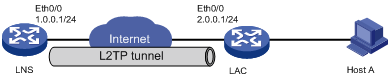
圖1所示,為實現PPPoE+L2TP功能配置主機,Host A作為PPPoE撥號客戶端,LAC作為PPPoE服務器及L2TP的LAC,LNS作為L2TP的LNS。

圖1 PPPoE + L2TP功能配置組網圖

3.2  配置思路

為了使Host A實現PPPoE上網,LAC建立虛模板並綁定連接主機的接口。為了使LNS能夠接受用戶端的Tunnel連接請求,LNS側和用戶端均啟用PPP認證,用戶端的認證模式和對應的LNS虛擬模板應保持一致。

3.3  使用版本

本舉例是在Release 2317版本上進行配置和驗證的。

3.4  配置注意事項

·     LAC要建立虛模板,用於PPPoE服務器在接口下綁定;

·     LNS要建立虛模板,用於接受L2TP連接請求;

·     LAC和LNS的L2TP隧道認證配置保持一致。

3.5  配置步驟

3.5.1  LAC的配置

<LAC> system-view                                                               

[LAC] l2tp enable                                                               

# 建立域

[LAC] domain h3c.com                                                            

[LAC-isp-h3c.com] authentication ppp local                                      

[LAC-isp-h3c.com] access-limit disable                                          

[LAC-isp-h3c.com] state active                                                  

[LAC-isp-h3c.com] idle-cut disable                                              

[LAC-isp-h3c.com] self-service-url disable                                      

[LAC-isp-h3c.com] quit                                                          

# 建立用戶

[LAC] local-user pc                                                             

[LAC-luser-pc] password simple pc                                               

[LAC-luser-pc] service-type ppp                                                 

[LAC-luser-pc] quit                                                             

# 建立L2TP分組

[LAC] l2tp-group 1                                                              

[LAC-l2tp1] tunnel password simple h3c                                          

[LAC-l2tp1] tunnel name h3c                                                     

[LAC-l2tp1] start l2tp ip 1.0.0.1 domain h3c.com                                

[LAC-l2tp1] quit                                                                

[LAC] interface ethernet0/0                                                     

[LAC-Ethernet0/0] port link-mode route                                          

[LAC-Ethernet0/0] ip address 2.0.0.1 255.255.255.0                              

[LAC-Ethernet0/0] quit                                                           

[LAC] interface ethernet0/1                                                     

[LAC-Ethernet0/1] port link-mode route                                          

[LAC-Ethernet0/1] pppoe-server bind Virtual-Template 0                          

[LAC-Ethernet0/1] quit                                                          

# 配置虛擬模板

[LAC] interface Virtual-Template0                                               

[LAC-Virtual-Template0] ppp authentication-mode chap domain h3c.com             

3.5.2  LNS的配置

<LNS> system-view                                                               

[LNS] l2tp enable                                                               

# 建立域,並設定地址池

[LNS] domain h3c.com                                                            

[LNS-isp-h3c.com] authentication ppp local                                      

[LNS-isp-h3c.com] access-limit disable                                          

[LNS-isp-h3c.com] state active                                                  

[LNS-isp-h3c.com] idle-cut disable                                              

[LNS-isp-h3c.com] self-service-url disable                                      

[LNS-isp-h3c.com] ip pool 1 100.0.0.2 100.0.0.255                               

[LNS-isp-h3c.com] quit                                                          

# 建立用戶

[LNS] local-user pc                                                             

[LNS-luser-pc] password simple pc                                               

[LNS-luser-pc] service-type ppp                                                 

[LNS-luser-pc] quit                                                             

# 建立L2TP分組

[LNS] l2tp-group 1                                                               

[LNS-l2tp1] mandatory-lcp                                                       

[LNS-l2tp1] allow l2tp virtual-template 0 remote h3c domain h3c.com             

[LNS-l2tp1] tunnel password simple h3c                                           

[LNS-l2tp1] quit                                                                

[LNS] interface ethernet0/0                                                     

[LNS-Ethernet0/0] port link-mode route                                          

[LNS-Ethernet0/0] ip address 1.0.0.1 255.255.255.0                              

[LNS-Ethernet0/0] quit                                                          

# 配置虛擬模板

[LNS] interface Virtual-Template0                                               

[LNS-Virtual-Template0] ppp authentication-mode chap domain h3c.com             

[LNS-Virtual-Template0] remote address pool 1                                   

[LNS-Virtual-Template0] ip address 100.0.0.1 255.255.255.0                      

3.6  驗證配置

(1)     驗證PPPoE配置

# 主機Host A利用寬帶連接上網,用戶名和密碼為pc,驗證成功,LAC上顯示

%Sep  2 09:17:26:150 2011 LAC IFNET/3/LINK_UPDOWN: Virtual-Template0:0 link stat

us is UP.                                                                      

%Sep  2 09:17:29:146 2011 LAC IFNET/5/LINEPROTO_UPDOWN: Line protocol on the int

erface Virtual-Template0:0 is UP.

(2)     驗證L2TP配置

# 在主機Host A上ping外網

C:\Windows\System32>ping 1.0.0.1

Pinging 1.0.0.1 with 32 bytes of data:

Reply from 1.0.0.1: bytes=32 time=1ms TTL=255

Reply from 1.0.0.1: bytes=32 time=1ms TTL=255

Reply from 1.0.0.1: bytes=32 time=2ms TTL=255

Reply from 1.0.0.1: bytes=32 time=1ms TTL=255

Ping statistics for 1.0.0.1:

    Packets: Sent = 4, Received = 4, Lost = 0 (0% loss),

Approximate round trip times in milli-seconds:

Minimum = 1ms, Maximum = 2ms, Average = 1ms

3.7  配置文件

·     LAC:

#                                                                              

 l2tp enable                                                                   

#                                                                              

domain h3c.com                                                                 

 authentication ppp local                                                      

 access-limit disable                                                          

 state active                                                                  

 idle-cut disable                                                               

 self-service-url disable                                                      

#                                                                              

local-user pc                                                                   

 password cipher $c$3$AKRN522HqGvlU2PLkUmmJZfWX2wd                             

 service-type ppp                                                              

#                                                                               

l2tp-group 1                                                                   

 tunnel password cipher $c$3$iNeA/rOh1uCceQ3qbiIP4ctFsA7kRQ==                  

 tunnel name h3c                                                                

 start l2tp ip 1.0.0.1 domain h3c.com                                          

#                                                                              

interface Ethernet0/0                                                           

 port link-mode route                                                          

 ip address 2.0.0.1 255.255.255.0                                              

#                                                                              

interface Ethernet0/1                                                          

 port link-mode route                                                          

 pppoe-server bind Virtual-Template 0                                          

#                                                                               

interface Virtual-Template0                                                    

 ppp authentication-mode chap domain h3c.com                                   

#                                                                               

·     LNS :

#                                                                              

 l2tp enable                                                                   

#                                                                               

domain h3c.com                                                                 

 authentication ppp local                                                      

 access-limit disable                                                           

 state active                                                                  

 idle-cut disable                                                              

 self-service-url disable                                                       

 ip pool 1 100.0.0.2 100.0.0.255                                               

#                                                                              

local-user pc                                                                   

 password cipher $c$3$ITGbqGRZ8oxRNeVc9UewnVUlZjsj                             

 service-type ppp                                                              

#                                                                              

l2tp-group 1                                                                   

 mandatory-lcp                                                                 

 allow l2tp virtual-template 0 remote h3c domain h3c.com                       

 tunnel password cipher $c$3$mpCjFh58lTOGfHQW94A9/SsKVC6vgQ==                  

#                                                                              

interface Ethernet0/0                                                          

 port link-mode route                                                          

 ip address 1.0.0.1 255.255.255.0                                              

#                                                                              

interface Virtual-Template0                                                    

 ppp authentication-mode chap domain h3c.com                                   

 remote address pool 1                                                         

 ip address 100.0.0.1 255.255.255.0                                            

#                                                                              

4  相關資料

·     H3C MSR 係列路由器 命令參考(V5)-R2311

·     H3C MSR 係列路由器 配置指導(V5)-R2311

不同款型規格的資料略有差異, 詳細信息請向具體銷售和400谘詢。H3C保留在沒有任何通知或提示的情況下對資料內容進行修改的權利!

BOB登陆
官網
聯係我們