S7000/S7500E/10500係列(V7)交換機Console密碼忘記處理方法
組網及說明
1 配置需求或說明
1.1 適用產品係列
本案例適用於如S7006、S7503E、S7506E、S7606、S10510、S10508等S7000、S7500E、S10500係列,且軟件版本是V7的交換機。
1.2 配置需求及實現的效果
清除Consle密碼,恢複出廠
2 組網圖
無
配置步驟
3 配置步驟
3.1 進入bootroom菜單清除Consle密碼
通過conlse線和crt軟件連接並登陸設備,然後把設備斷電重啟。控製台上會打印如下信息,當出現“press Ctrl+B”的時候快速按住“Ctrl+B” 進入botroom菜單
System is starting...
Press Ctrl+D to access BASIC-BOOTWARE MENU
Booting Normal Extend BootWare
The Extend BootWare is self-decompressing.......................Done!
BootWare Validating...
Press Ctrl+B to enter extended boot menu...
BotWare password: Not required. Please press Enter to continue.
Password recovery capability is enabled.
Note: The current operating device is flash
Enter < Storage Device Operation > to select device.
按住“Ctrl+B”進入如下菜單。選擇“<6> Skip Current System Configuration”跳過當前配置啟動,不同設備可能不是數字6,
===========================<EXTEND-BOOTWARE MENU>===========================
|<1> Boot System |
|<2> Enter Serial SubMenu |
|<3> Enter Ethernet SubMenu |
|<4> File Control |
|<5> Restore to Factory Default Configuration |
|<6> Skip Current System Configuration |
|<7> BootWare Operation Menu |
|<8> Clear Super Password |
|<9> Storage Device Operation |
|<0> Reboot |
============================================================================
Ctrl+Z: Access EXTEND-ASSISTANT MENU
Ctrl+F: Format File System
Enter your choice(0-9): 6
Flag Set Success.
然後輸入0重啟設備
===========================<EXTEND-BOOTWARE MENU>===========================
|<1> Boot System |
|<2> Enter Serial SubMenu |
|<3> Enter Ethernet SubMenu |
|<4> File Control |
|<5> Restore to Factory Default Configuration |
|<6> Skip Current System Configuration |
|<7> BootWare Operation Menu |
|<8> Clear Super Password |
|<9> Storage Device Operation |
|<0> Reboot |
============================================================================
Ctrl+Z: Access EXTEND-ASSISTANT MENU
Ctrl+F: Format File System
Enter your choice(0-9): 0
System is starting...
Press ENTER to get started.
3.2 如果不需要之前的配置信息的話
操作步驟:跳過啟動文件後直接保存當前配置,再重啟。
<H3C>save
The current configuration will be written to the device. Are you sure? [Y/N]:y
Please input the file name(*.cfg)[flash:/startup.cfg]
(To leave the existing filename unchanged, press the enter key):(輸入回車)
flash:/startup.cfg exists, overwrite? [Y/N]:y
Validating file. Please wait...
Configuration is saved to device successfully.
<H3C>reboot
Start to check configuration with next startup configuration file, please wait.........DONE!
Current configuration may be lost after the reboot, save current configuration? [Y/N]:y
This command will reboot the device. Continue? [Y/N]:y
3.3 如果需要之前的配置信息的話
<H3C>
#Apr 26 12:02:07:166 2000 H3C SHELL/4/LOGIN:
Trap 1.3.6.1.4.1.25506.2.2.1.1.3.0.1<hh3cLogIn>: login from Console
%Apr 26 12:02:07:306 2000 H3C SHELL/5/SHELL_LOGIN: Console logged in from aux0.
<H3C>dir %查看設備配置文件
Directory of flash:/
1 drw- - Apr 26 2000 12:00:20 logfile
2 -rw- 1666 Apr 26 2000 12:05:39 startup.cfg
3 -rw- 1556 Apr 26 2000 12:05:33 _startup_bak.cfg
4 -rw- 151 Apr 26 2000 12:05:30 system.xml
29106 KB total (16876 KB free)
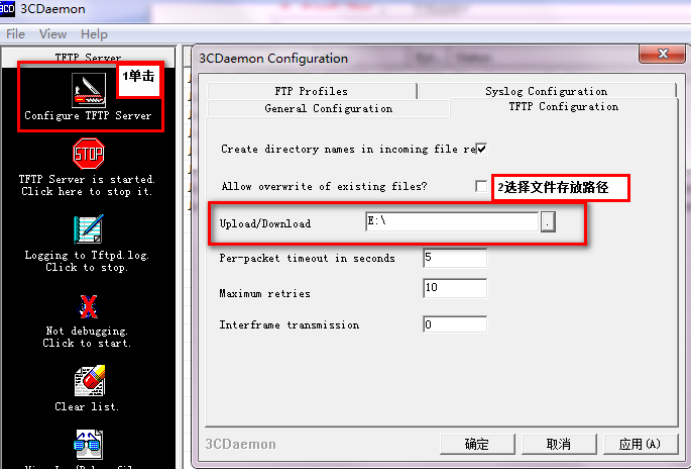
給設備和電腦配置成同網段IP地址(舉例:WAC配置成192.168.100.1,電腦配置成192.168.100.2),在電腦上通過3CD軟件搭建tftp服務器。
<H3C>sys
System View: return to User View with Ctrl+Z.
[H3C]interface Vlan-interface 1
[H3C-Vlan-interface1]ip address 192.168.100.1 24
[H3C-Vlan-interface1]quit
[H3C]ping 192.168.100.2
PING 192.168.100.2: 56 data bytes, press CTRL_C to break
Reply from 192.168.100.2: bytes=56 Sequence=1 ttl=128 time=7 ms
Reply from 192.168.100.2: bytes=56 Sequence=2 ttl=128 time=2 ms
<H3C>tftp 192.168.100.2 put startup.cfg
File will be transferred in binary mode
Sending file to remote TFTP server. Please wait... |
TFTP: 1666 bytes sent in 0 second(s).
File uploaded successfully.
<H3C>
下載成功:
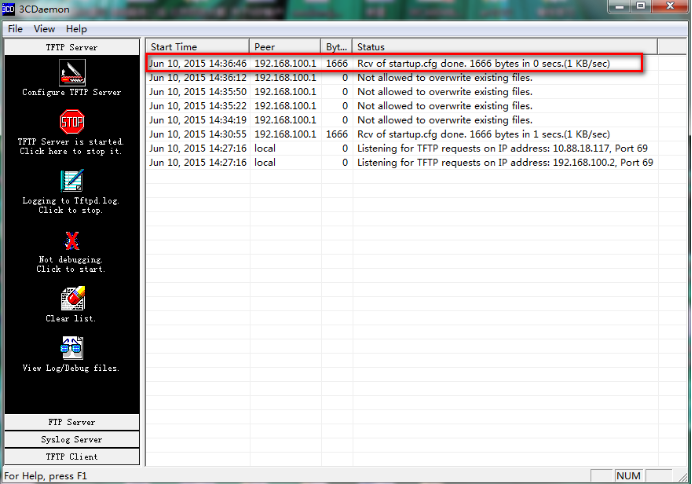
可以到本地相關路徑(此例子中是E盤)查看到相關文件。
需要恢複之前配置
解決方法:刪除密碼恢複之前配置文件
使用記事本打開startup.cfg文件
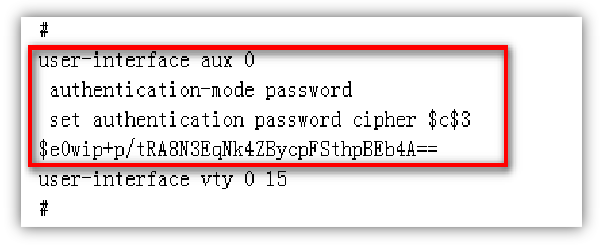
刪除aux0口下的認證方式和密碼並保存文件
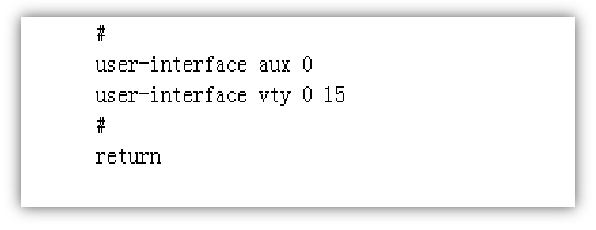
覆蓋當前配置文件
<H3C>tftp 192.168.100.20 get startup.cfg
The file startup.cfg exists. Overwrite it? [Y/N]:y
Verifying server file...
Deleting the old file, please wait...
...
File will be transferred in binary mode
Downloading file from remote TFTP server, please wait....
TFTP: 1166 bytes received in 0 second(s)
File downloaded successfully.
<H3C>reboot
Start to check configuration with next startup configuration file, please wait.........DONE!
Current configuration may be lost after the reboot, save current configuration? [Y/N]:n 不保存配置
This command will reboot the device. Continue? [Y/N]:y 確定繼續重啟