組網及說明

配置步驟
3 配置步驟
3.1 配置SWA為DHCPv6服務器
#配置SWA(DHCPv6服務器)與SWB(DHCPv6中繼)的IPV6互聯接口所屬vlan 1的虛接口地址。取消設備發布RA消息的抑製。配置被管理地址的配置標誌位為1,即主機通過DHCPv6服務器獲取IPv6地址。配置其他信息配置標誌位為1,即主機通過DHCPv6服務器獲取除IPv6地址以外的其他信息。
<SWA>system-view
System View: return to User View with Ctrl+Z.
[SWA]int vlan 1
[SWA-Vlan-interface1] ipv6 address 1::1/64
[SWA-Vlan-interface1] ipv6 nd autoconfig managed-address-flag
[SWA-Vlan-interface1] ipv6 nd autoconfig other-flag
[SWA-Vlan-interface1] undo ipv6 nd ra halt
#配置接口Vlan-interface1工作在DHCPv6服務器模式。
[SWA-Vlan-interface1] ipv6 dhcp select server
[SWA-Vlan-interface1] quit
#配置不參與自動分配的IPv6地址,以避免分配DNS服務器的地址。
[SWA]ipv6 dhcp server forbidden-address 2::1
[SWA]ipv6 dhcp server forbidden-address 3::1
#配置DHCPv6服務器地址池為1,為客戶端分配2::/64的IPv6地址。
[SWA]ipv6 dhcp pool 1
[SWA-dhcp6-pool-1] network 2::/64
[SWA-dhcp6-pool-1] dns-server 2::1
[SWA-dhcp6-pool-1] gateway-list 2::1
[SWA-dhcp6-pool-1]quit
#配置DHCPv6服務器地址池為2,為客戶端分配3::/64的IPv6地址。
[SWA]ipv6 dhcp pool 2
[SWA-dhcp6-pool-2] network 3::/64
[SWA-dhcp6-pool-2] dns-server 3::1
[SWA-dhcp6-pool-2] gateway-list 3::1
[SWA-dhcp6-pool-2]quit
#SWA上添加到DHCPv6中繼的IPv6靜態路由。
[SWA] ipv6 route-static 2:: 64 1::2
[SWA] ipv6 route-static 3:: 64 1::2
#保存配置
[SWA] save for
3.2 配置SWB為DHCPv6中繼
#配置SWB上創建vlan 2、vlan 3,將接口Ethernet 1/0/2加入vlan 2,接口Ethernet 1/0/3加入vlan 3。
<SWB>sys
System View: return to User View with Ctrl+Z.
[SWB]vlan 2 to 3
[SWB]int Ethernet 1/0/2
[SWB-Ethernet1/0/2]port access vlan 2
[SWB-Ethernet1/0/2]quit
[SWB]int Ethernet 1/0/3
[SWB-Ethernet1/0/3]port access vlan 3
[SWB-Ethernet1/0/3]quit
#配置SWB與SWA的互聯接口所屬vlan1虛接口的IPv6地址。
[SWB]interface Vlan-interface1
[SWB-Vlan-interface1] ipv6 address 1::2/64
#配置vlan 2和vlan 3虛接口IPv6地址。取消設備發布RA消息的抑製。配置被管理地址的配置標誌位為1,即主機通過DHCPv6服務器獲取IPv6地址。配置其他信息配置標誌位為1,即主機通過DHCPv6服務器獲取除IPv6地址以外的其他信息。
[SWB]int vlan 2
[SWB-Vlan-interface2] ipv6 address 2::1/64
[SWB-Vlan-interface2] ipv6 nd autoconfig managed-address-flag
[SWB-Vlan-interface2] ipv6 nd autoconfig other-flag
[SWB-Vlan-interface2] undo ipv6 nd ra halt
[SWB-Vlan-interface2]quit
[SWB]int vlan 3
[SWB-Vlan-interface3] ipv6 address 3::1/64
[SWB-Vlan-interface3] ipv6 nd autoconfig managed-address-flag
[SWB-Vlan-interface3] ipv6 nd autoconfig other-flag
[SWB-Vlan-interface3] undo ipv6 nd ra halt
[SWB-Vlan-interface3]quit
#SWB上添加到DHCPv6服務器的IPv6靜態路由。
[SWB] ipv6 route-static :: 0 1::1
#分別配置vlan 2、vlan 3虛接口工作在DHCPv6中繼模式,指定1::1為DHCPv6服務器地址。
[SWB] int vlan 2
[SWB-Vlan-interface2]ipv6 dhcp select relay
[SWB-Vlan-interface2]ipv6 dhcp relay server-address 1::1
[SWB-Vlan-interface2]quit
[SWB] int vlan 3
[SWB-Vlan-interface3]ipv6 dhcp select relay
[SWB-Vlan-interface3]ipv6 dhcp relay server-address 1::1
[SWB-Vlan-interface3]quit
#保存配置
[SWA] save for
4 驗證配置
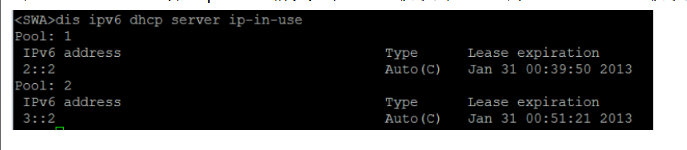
#在SWA上DHCPv6分配ipv6地址情況如下,PC1獲取到2::2/64的IPv6地址,PC2獲取到3::2/64的IPv6地址。