組網及說明
1 配置需求或說明
1.1 適用產品係列
|
1.1
配置需求
公司內部部署了一台組播源,為保證終端能正常接收組播源傳輸的業務,需在所經交換機上開啟組播功能。
2 組網圖

配置步驟
3 配置步驟
3.1
配置SW1的IP地址和互聯路由
<H3C>system–view
#新建互聯VLAN10
[H3C]vlan 10
#將10口加入到VLAN10
[H3C]interface Ethernet1/0/10
[H3C-Ethernet1/0/10]port access vlan 10
[H3C-Ethernet1/0/10]quit
#配置交換機間互聯地址
[H3C]interface
Vlan-interface10
[H3C-Vlan-interface10]ip
address 172.16.10.1 255.255.255.0
[H3C-Vlan-interface10]quit
#
[H3C]interface
Vlan-interface1
[H3C-Vlan-interface1]ip
address 192.168.1.1 255.255.255.0
[H3C-Vlan-interface1]quit
#
[H3C]ip
route-static 192.168.2.0 255.255.255.0 172.16.10.2
3.2 SW1上開啟組播路由功能,接口下使能PIM DM
#
[H3C]multicast
routing-enable
#
[H3C]interface
Vlan-interface10
[H3C-Vlan-interface10]pim
dm
[H3C-Vlan-interface10]quit
#
[H3C]interface
Vlan-interface1
[H3C-Vlan-interface1]pim
dm
[H3C-Vlan-interface1]quit
[H3C]save
配置SW2的IP地址和互聯路由
<H3C>system–view
#
[H3C]vlan 10
#
[H3C]interface
GigabitEthernet 1/0/10
[H3C-GigabitEthernet1/0/10]port
access vlan 10
[H3C-GigabitEthernet1/0/10]quit
#
[H3C]interface
Vlan-interface10
[H3C-Vlan-interface10]ip
address 172.16.10.2 255.255.255.0
[H3C-Vlan-interface10]quit
#
[H3C]interface
Vlan-interface1
[H3C-Vlan-interface1]ip
address 192.168.2.1 255.255.255.0
[H3C-Vlan-interface1]quit
#
[H3C]ip
route-static 192.168.1.0 255.255.255.0 172.16.10.1
3.3
SW2上開啟組播路由功能,設備互聯接口使能PIM-DM,組播接受者接口使能IGMP
#開啟組播路由功能
[H3C]multicast routing-enable
#互聯接口接口使能PIM-DM功能
[H3C]interface Vlan-interface10
[H3C-Vlan-interface10]pim dm
[H3C-Vlan-interface10]quit
#連接組播客戶端接口使能IGMP功能
[H3C]interface Vlan-interface1
[H3C-Vlan-interface1]igmp enable
[H3C-Vlan-interface1]quit
[H3C]save
3.4
檢查配置結果
組播源:
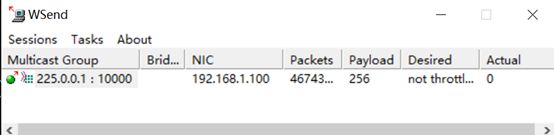
dis pim
routing-table
VPN-Instance:
public net
Total 0 (*, G)
entry; 1 (S, G) entry
(192.168.1.100, 225.0.0.1)
Protocol:
pim-dm, Flag: LOC ACT
UpTime:
00:00:17
Upstream
interface: Vlan-interface1
Upstream
neighbor: NULL
RPF prime
neighbor: NULL
Downstream
interface(s) information:
Total number
of downstreams: 1
1: Vlan-interface10
Protocol: pim-dm, UpTime: 00:00:07, Expires: never
組播客戶端:

<H3C>dis pim routing-table
VPN-Instance: public net
Total 2 (*, G) entries; 1 (S, G) entry
(*, 225.0.0.1)
Protocol: pim-dm, Flag: WC EXT
UpTime: 00:05:45
Upstream interface: NULL
Upstream neighbor: NULL
RPF prime neighbor: NULL
Downstream interface(s) information: None
(192.168.1.100, 225.0.0.1)
Protocol: pim-dm, Flag: EXT ACT
UpTime: 00:08:12
Upstream interface: Vlan-interface10
Upstream neighbor: 172.16.10.1
RPF prime neighbor: 172.16.10.1
Downstream interface(s) information: None
(*, 239.255.255.250)
Protocol: pim-dm, Flag: WC EXT
UpTime: 00:05:42
Upstream interface: NULL
Upstream neighbor: NULL
RPF prime neighbor: NULL
Downstream interface(s) information: None