建設ipsecvpn,如果2家機構有相同的內部ip地址網段怎麼處理
- 0關注
- 0收藏,2892瀏覽

問題描述:
2家機構通過ipsecvpn互聯,比如A有ip段172.16.0.0/24,B也有相同的地址段,現在B的這個地址要通過vpn訪問A,A的返程就碰到了路由的問題,有什麼辦法解決。
- 2024-10-11提問
- 舉報
-
(0)
最佳答案


參考案例:
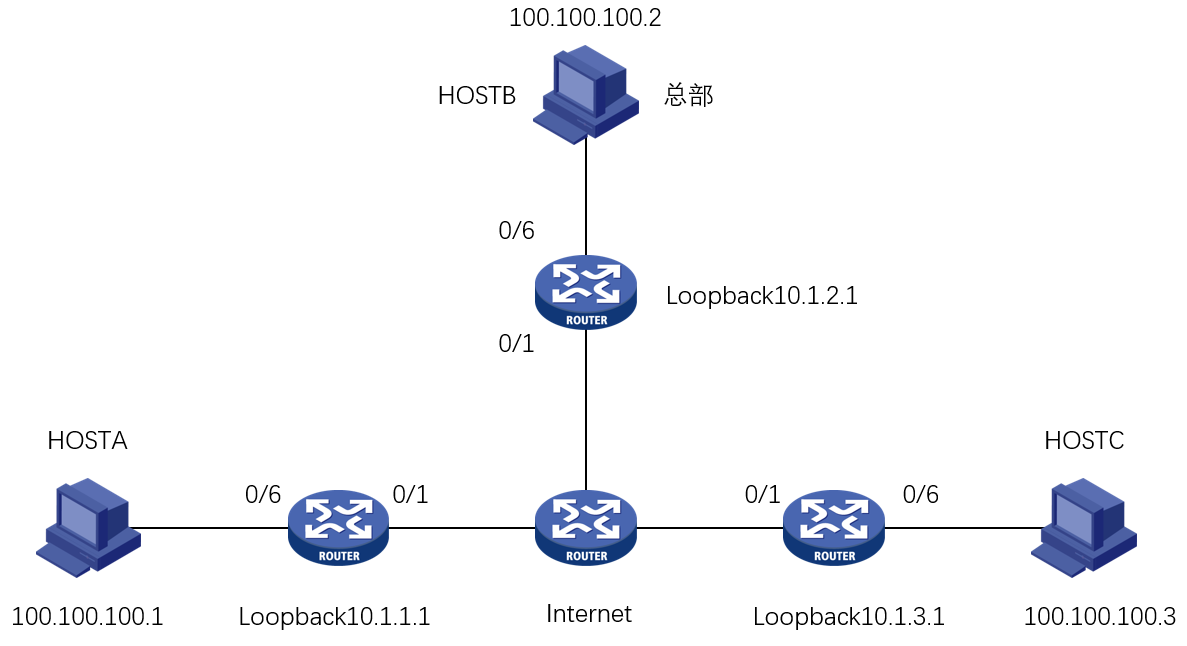
現場HOSTB為總部,HOSTA和HOSTC為分支需要通過IPSEC VPN和總部互訪(分支之間也需要互相訪問),總部使用固定地址,分支4G撥號動態獲地址和總部使用野蠻模式建立IPSEC隧道。由於兩個分支和總部內網網段衝突,不可以直接通過ipsec隧道去訪問總部,可以通過建立靜態vxlan隧道實現大二層互通。
配置步驟
HOSTA
# 配置接口Loopback0的IP地址,作為隧道的源端地址
interface LoopBack0
ip address 10.1.1.1 255.255.255.0
# 接口下調用ipsec策略
interface GigabitEthernet1/0/1
ip address 1.1.1.1 255.255.0.0
ipsec apply policy policy1
# 配置去往公網的默認路由
ip route-static 0.0.0.0 0 1.1.1.2
# IPSEC感興趣流
acl advanced 3000
rule 0 permit ip source 10.1.1.0 0.0.0.255 destination 10.1.2.0 0.0.0.255
rule 1 permit ip source 10.1.1.0 0.0.0.255 destination 10.1.3.0 0.0.0.255
#
ipsec transform-set transform1
esp encryption-algorithm 3des-cbc
esp authentication-algorithm md5
#
ipsec policy policy1 1 isakmp
transform-set transform1
security acl 3000
remote-address 2.2.2.2
ike-profile profile1
#
ike profile profile1
keychain keychain1
exchange-mode aggressive
local-identity fqdn devicea
match remote identity address 2.2.2.2 255.255.0.0
#
ike keychain keychain1
pre-shared-key address 2.2.2.2 255.255.0.0 key H3c
#
HOSTB
# 配置接口Loopback0的IP地址,作為隧道的源端地址
interface LoopBack0
ip address 10.1.2.1 255.255.255.0
# 接口下調用ipsec策略
interface GigabitEthernet1/0/1
ip address 2.2.2.2 255.255.0.0
ipsec apply policy policy1
# 配置去往公網的靜態路由
ip route-static 0.0.0.0 0 2.2.2.1
#
ipsec transform-set transform1
esp encryption-algorithm 3des-cbc
esp authentication-algorithm md5
#
ipsec policy-template template1 1
transform-set transform1
local-address 2.2.2.2
ike-profile profile1
#
ipsec policy-template template1 2
transform-set transform1
local-address 2.2.2.2
ike-profile profile2
#
ipsec policy policy1 1 isakmp template template1
#
ipsec policy policy1 2 isakmp template template2
#
ike profile profile1
keychain keychain1
exchange-mode aggressive
match remote identity fqdn devicea
#
ike profile profile2
keychain keychain2
exchange-mode aggressive
match remote identity fqdn devicec
#
ike keychain keychain1
pre-shared-key address 1.1.1.1 255.255.0.0 key H3C
#
ike keychain keychain2
pre-shared-key address 3.3.3.2 255.255.0.0 key H3C
#
HOSTC
# 配置接口Loopback0的IP地址,作為隧道的源端地址
interface LoopBack0
ip address 10.1.3.1 255.255.255.0
# 接口下調用ipsec策略
interface GigabitEthernet1/0/1
ip address 3.3.3.2 255.255.0.0
ipsec apply policy policy1
# 配置去往公網的靜態路由
ip route-static 0.0.0.0 0 3.3.3.1
# 配置IPSEC感興趣流
acl advanced 3000
rule 0 permit ip source 10.1.3.0 0.0.0.255 destination 10.1.2.0 0.0.0.255
rule 0 permit ip source 10.1.3.0 0.0.0.255 destination 10.1.1.0 0.0.0.255
#
ipsec transform-set transform1
esp encryption-algorithm 3des-cbc
esp authentication-algorithm md5
#
ipsec policy policy1 1 isakmp
transform-set transform1
security acl 3000
remote-address 2.2.2.2
ike-profile profile1
#
ike profile profile1
keychain keychain1
exchange-mode aggressive
local-identity fqdn devicec
match remote identity address 2.2.2.2 255.255.0.0
#
ike keychain keychain1
pre-shared-key address 2.2.2.2 255.255.0.0 key H3C
2.總部和分支1建立vxlan隧道tunnel100,總部和分支2建立vxlan隧道200,分支1通過分支2和總部建立vxlan隧道tunnel300
HOSTA
# 開啟L2VPN能力
l2vpn enable
# 創建vsi實例test和vxlan 1 並使Tunnel100和Tunnel300關聯vxlan1
vsi test
vxlan 1
tunnel 100
tunnel 300
# 接口關聯VSI實例vpn1
interface GigabitEthernet1/0/6
xconnect vsi test
# 在HOSTA和HOSTB之間建立VXLAN隧道
interface Tunnel100 mode vxlan
source 10.1.1.1
destination 10.1.2.1
# 在HOSTA和HOSTC之間建立VXLAN隧道
interface Tunnel300 mode vxlan
source 10.1.1.1
destination 10.1.3.1
#
HOSTB
# 開啟L2VPN能力
l2vpn enable
# 創建vsi實例test和vxlan 1 並使Tunnel100和Tunnel200關聯vxlan1
vsi test
vxlan 1
tunnel 100
tunnel 200
# 接口關聯VSI實例vpn1
interface GigabitEthernet1/0/6
xconnect vsi test
# 在HOSTA和HOSTB之間建立VXLAN隧道
interface Tunnel100 mode vxlan
source 10.1.2.1
destination 10.1.1.1
# 在HOSTC和HOSTB之間建立VXLAN隧道
interface Tunnel200 mode vxlan
source 10.1.2.1
destination 10.1.3.1
#
HOSTC
# 開啟L2VPN能力
l2vpn enable
# 創建vsi實例test和vxlan 1 並使Tunnel200和Tunnel300關聯vxlan1
vsi test
vxlan 1
tunnel 200
tunnel 300
# 接口關聯VSI實例vpn1
interface GigabitEthernet1/0/6
xconnect vsi test
# 在HOSTC和HOSTB之間建立VXLAN隧道
interface Tunnel200 mode vxlan
source 10.1.3.1
destination 10.1.2.1
# 在HOSTA和HOSTC之間建立VXLAN隧道
interface Tunnel300 mode vxlan
source 10.1.3.1
destination 10.1.1.1
配置關鍵點
當現場出現總部和分支內網網段相同的時候,我們內網訪問的流量無法使用ipsec隧道進行互訪,所以我們需要創建一個vxlan over ipsec的網絡,使用ipsec使設備的loopback接口互通,然後使用loopback接口建立vxlan隧道,這樣就能實現總部和分支之間同網段互相訪問。如果兩個分支之間互相訪問,那麼我們就需要在兩個分支之創建一個vxlan隧道,實際流量還是要經過我們的總部設備的轉發。
- 2024-10-11回答
- 評論(3)
- 舉報
-
(0)


親~登錄後才可以操作哦!
確定你的郵箱還未認證,請認證郵箱或綁定手機後進行當前操作
舉報
×
侵犯我的權益
×
侵犯了我企業的權益
×
- 1. 您舉報的內容是什麼?(請在郵件中列出您舉報的內容和鏈接地址)
- 2. 您是誰?(身份證明材料,可以是身份證或護照等證件)
- 3. 是哪家企業?(營業執照,單位登記證明等證件)
- 4. 您與該企業的關係是?(您是企業法人或被授權人,需提供企業委托授權書)
抄襲了我的內容
×
原文鏈接或出處
誹謗我
×
- 1. 您舉報的內容以及侵犯了您什麼權益?(請在郵件中列出您舉報的內容、鏈接地址,並給出簡短的說明)
- 2. 您是誰?(身份證明材料,可以是身份證或護照等證件)
對根叔社區有害的內容
×
不規範轉載
×
舉報說明
嗯,就是看有麼有其他辦法