無線雲集群問題
- 1關注
- 0收藏,2007瀏覽

問題描述:
[H3C-ccluster-member-1]cluster-link data bind interface Ten-GigabitEthernet 1/3/10
The system will shut down and then bring up the interface after activation the cloud cluster configuration. Continue? [Y/N]: y
Check failed for reason:
An cloud-cluster port can't have both hybrid channels and non-hybrid channels.The hybrid channel type applies to an cloud-cluster network interface if you do not specify a channel type for the interface.
部署雲集群AC的data口,端口要設置成?
- 2024-03-12提問
- 舉報
-
(0)
最佳答案

參考配置:
2.1 組網需求
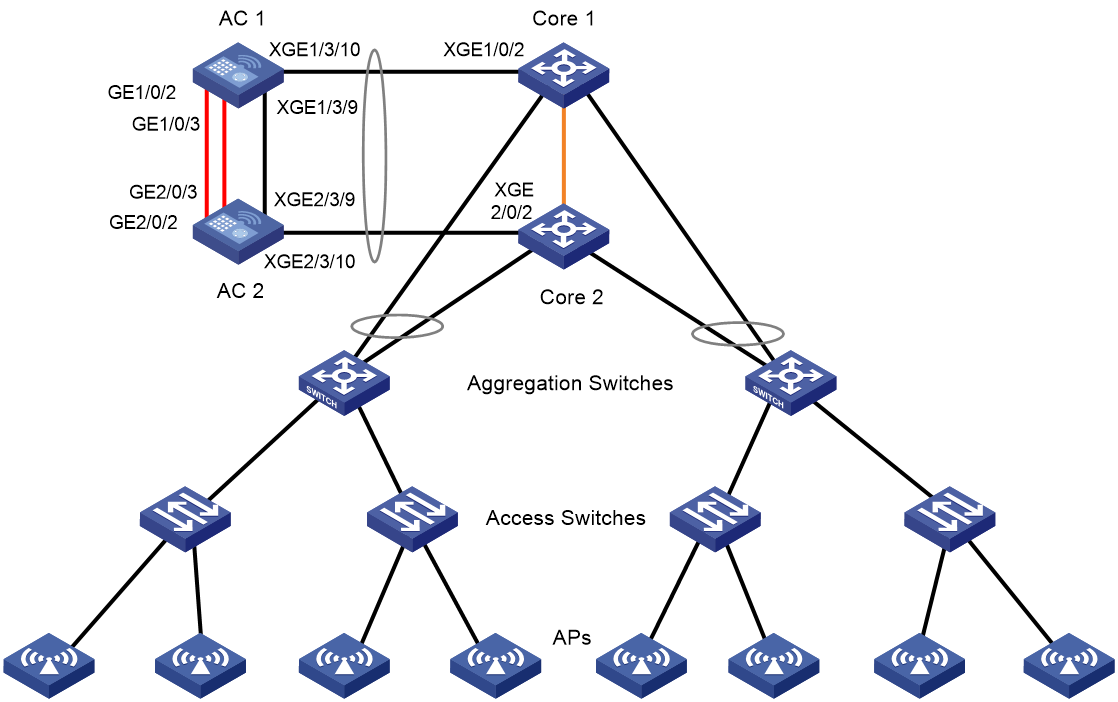
AC 1和AC 2通過直連鏈路建立雲集群,AC 1作為主設備,雲集群和核心交換機之間建立動態聚合鏈路,用於LACP MAD檢測和業務報文的轉發。
圖20 雲集群組網圖
2.2 配置注意事項
使用2台同型號的AC建立雲集群。
如果通過其他組網方式升級為雲集群,建議先清空AC的配置並重啟設備,然後搭建集群組網,最後再配置其它業務。
2.3 功能配置
2.3.1 配置前提
· Core Switch 1和Core Switch 2為穩定運行的Comware V7 IRF係統。
· 請首先將AC 1和AC 2與交換機相連的業務接口通過shutdown命令關閉,防止在配置動態聚合前設備間產生環路,在集群建立完成並且動態聚合配置完成後再開啟接口。
2.3.2 配置Core 1和Core 2
# 創建二層聚合接口1,並配置該聚合接口對應的聚合組工作在動態聚合模式下。
<Core> system-view
[Core] interface bridge-aggregation 1
[Core-Bridge-Aggregation1] link-aggregation mode dynamic
[Core-Bridge-Aggregation1] quit
# 將端口Ten-GigabitEthernet1/0/2加入到聚合組1中。
[Core] interface ten-gigabitethernet 1/0/2
[Core-Ten-GigabitEthernet1/0/1] port link-aggregation group 1
[Core-Ten-GigabitEthernet1/0/1] quit
# 將端口Ten-GigabitEthernet2/0/2加入到聚合組1中。
[Core] interface ten-gigabitethernet 2/0/2
[Core-Ten-GigabitEthernet1/0/2] port link-aggregation group 1
[Core-Ten-GigabitEthernet1/0/2] quit
# 開啟聚合流量重定向功能。
[Core] link-aggregation lacp traffic-redirect-notification enable
2.3.3 配置AC 1
(1) 配置設備在雲集群中的成員編號
# 設備出廠默認的成員編號為1,故不需要配置。
(2) 配置設備在雲集群中的成員IP
# 雲集群中成員設備的成員IP地址必須同網段,故雲集群自身需要單獨占用一個IP網段,請依據實際情況提前規劃。本文以192.168.10.x/24舉例。
[AC1-ccluster-member-1] member-ip 192.168.10.10 24
(3) 指定設備要加入的集群IP地址
# 集群IP地址即Leader的IP地址,本例中AC 1作為Leader,故不需要配置。
(4) 綁定雲集群端口
# 雲集群需要配置控製通道和數據數據通道的物理接口。在Gigabitethernet1/0/2和Gigabitethernet1/0/3上部署控製通道,以形成冗餘備份。
[AC1-ccluster-member-1] cluster-link control bind interface GigabitEthernet 1/0/2
The system will shut down and then bring up the interface after activation the cloud cluster configuration. Continue? [Y/N]: y
[AC1-ccluster-member-1] cluster-link control bind interface GigabitEthernet 1/0/3
The system will shut down and then bring up the interface after activation the cloud cluster configuration. Continue? [Y/N]: y
# 在Ten-Gigabitethernet1/3/9上部署數據通道。為滿足數據通道的帶寬需求,推薦數據通道使用Ten-Gigabitethernet接口或至少2個Gigabitethernet接口。
[AC1-ccluster-member-1] cluster-link data bind interface Ten-GigabitEthernet 1/3/9
The system will shut down and then bring up the interface after activation the cloud cluster configuration. Continue? [Y/N]: y
[AC1-ccluster-member-1] quit
(5) 激活雲集群配置
# 設備重啟後配置生效。
[AC1] cloud-cluster configuration active
New cluster configuration:
cloud-cluster service-cluster domain 0
cloud-cluster hello cloud-timeout 3 service-timeout 5
cloud-cluster member 1
member-ip 192.168.10.10/24
join-cluster ip 192.168.10.10
role manager-worker
cluster-link control bind interface GigabitEthernet1/0/2
cluster-link data bind interface Ten-GigabitEthernet 1/3/9
The system will activate and save the configuration, and it might do a restart. Continue? [Y/N]:y
The current configuration will be written to the device. Are you sure? [Y/N]:y
Please input the file name(*.cfg)[flash:/startup.cfg]
(To leave the existing filename unchanged, press the enter key):test.cfg
2.3.4 配置AC 2
(1) 配置設備在雲集群中的成員編號
# 每台設備的成員編號必須在雲集群內唯一,故將設備在雲集群中的成員編號修改為2。在激活雲集群配置後生效。
<AC2> system-view
[AC2] cloud-cluster member 1 renumber 2
This command will take effect after the cloud cluster configuration is activated. The command might result in configuration change or loss when it takes effect. Continue? [Y/N]: y
[AC2] cloud-cluster member 1
[AC2-ccluster-member-1]
(2) 配置設備在雲集群中的成員IP
# 雲集群中成員設備的成員IP地址必須同網段。
[AC2-ccluster-member-1] member-ip 192.168.10.11 24
(3) 指定設備要加入的集群IP地址
# 集群IP地址即Leader的IP地址,本例中AC 1作為Leader,IP地址為192.168.10.10。
[AC2-ccluster-member-1] join-cluster ip 192.168.10.10
(4) 綁定雲集群端口
# 雲集群需要配置控製通道和數據數據通道的物理接口。在Gigabitethernet1/0/2和Gigabitethernet1/0/3上部署控製通道,以形成冗餘備份。
[AC2-ccluster-member-1] cluster-link control bind interface GigabitEthernet 1/0/2
The system will shut down and then bring up the interface after activation the cloud cluster configuration. Continue? [Y/N]: y
[AC2-ccluster-member-1] cluster-link control bind interface GigabitEthernet 1/0/3
The system will shut down and then bring up the interface after activation the cloud cluster configuration. Continue? [Y/N]: y
# 在Ten-Gigabitethernet1/3/9上部署數據通道。為滿足數據通道的帶寬需求,推薦數據通道使用Ten-Gigabitethernet接口或至少2個Gigabitethernet接口。
[AC2-ccluster-member-1] cluster-link data bind interface Ten-GigabitEthernet 1/3/9
The system will shut down and then bring up the interface after activation the cloud cluster configuration. Continue? [Y/N]: y
[AC2-ccluster-member-1] quit
(5) 激活雲集群配置
# 設備重啟後配置生效。
[AC2] cloud-cluster configuration active
New cluster configuration:
cloud-cluster service-cluster domain 0
cloud-cluster hello cloud-timeout 3 service-timeout 5
cloud-cluster member 2
member-ip 192.168.10.11/24
join-cluster ip 192.168.10.10
role manager-worker
cluster-link control bind interface GigabitEthernet2/0/2
cluster-link data bind interface Ten-GigabitEthernet 2/3/9
The system will activate and save the configuration, and it might do a restart. Continue? [Y/N]:y
The current configuration will be written to the device. Are you sure? [Y/N]:y
Please input the file name(*.cfg)[flash:/startup.cfg]
(To leave the existing filename unchanged, press the enter key):test.cfg
2.3.5 配置LACP MAD檢測
# 創建二層聚合接口1,並配置該聚合接口對應的聚合組工作在動態聚合模式下。
<AC1> system-view
[AC1] interface bridge-aggregation 1
[AC1-Bridge-Aggregation1] link-aggregation mode dynamic
# 開啟LACP MAD檢測功能。
[AC1-Bridge-Aggregation1] mad enable
You need to assign a domain ID (range: 0-4294967295)
[Current domain ID is: 0]: 1
The assigned domain ID is: 1
[AC1-Bridge-Aggregation1] quit
# 將端口Ten-GigabitEthernet1/3/10加入到聚合組1中。
[AC1] interface ten-gigabitethernet 1/3/10
[AC1-Ten-GigabitEthernet1/3/10] port link-aggregation group 1
[AC1-Ten-GigabitEthernet1/3/10] quit
# 將端口Ten-GigabitEthernet2/3/10加入到聚合組1中。
[AC1] interface ten-gigabitethernet 2/3/10
[AC1-Ten-GigabitEthernet2/3/10] port link-aggregation group 1
[AC1-Ten-GigabitEthernet2/3/10] quit
2.3.1 配置無線熱備功能
# 配置AP熱備份功能
<AC1> system-view
[AC1] wlan ap-backup hot-backup enable global
This operation will enable fast switchover for AP backup.
# 配置客戶端熱備份功能
[AC1] wlan client-backup hot-backup enable
2.3.2 驗證
# 顯示物理集群的相關信息,可以看到物理集群中有兩台設備,AC 1是Leader,AC 2是Follower。
<AC1> display cloud-cluster
Manager list:
Member ID Role Member IP State Heartbeat(ms)
1 Leader 192.168.10.10 online 100
2 Follower 192.168.10.11 online 0
Worker list:
Member ID State Heartbeat(ms) Joined at
1 online 100 2023-02-12 06:13:28
2 online 200 2023-02-12 06:13:28
# 顯示容器集群的相關信息,可以看到AC 1上的容器為Master,AC 2上的容器是Standby。
<AC1> display cloud-cluster service-cluster container
Container ID Slot ID Member ID Role Status
1 1 1 Master Online
2 2 2 Standby Online
- 2024-03-12回答
- 評論(4)
- 舉報
-
(0)
trunk?
案例加上了,參考下吧
# interface Ten-GigabitEthernet1/3/10 port link-mode bridge
我按案例來的,沒說要改data端口類型。


親~登錄後才可以操作哦!
確定你的郵箱還未認證,請認證郵箱或綁定手機後進行當前操作
舉報
×
侵犯我的權益
×
侵犯了我企業的權益
×
- 1. 您舉報的內容是什麼?(請在郵件中列出您舉報的內容和鏈接地址)
- 2. 您是誰?(身份證明材料,可以是身份證或護照等證件)
- 3. 是哪家企業?(營業執照,單位登記證明等證件)
- 4. 您與該企業的關係是?(您是企業法人或被授權人,需提供企業委托授權書)
抄襲了我的內容
×
原文鏈接或出處
誹謗我
×
- 1. 您舉報的內容以及侵犯了您什麼權益?(請在郵件中列出您舉報的內容、鏈接地址,並給出簡短的說明)
- 2. 您是誰?(身份證明材料,可以是身份證或護照等證件)
對根叔社區有害的內容
×
不規範轉載
×
舉報說明
我按案例來的,沒說要改data端口類型。