S7000/S7500E/10500係列交換機使用XModem協議升級軟件版本方法(V5)
- 0關注
- 0收藏 2726瀏覽

組網及說明
1 配置需求或說明
1.1 適用產品係列
本案例適用於如S7006、S7503E、S7506E、S7606、S10510、S10508等S7000、S7500E、S10500係列,且軟件版本是V5的交換機 本文以S5024Pv2-EI為例。
1.2 配置需求及實現的效果
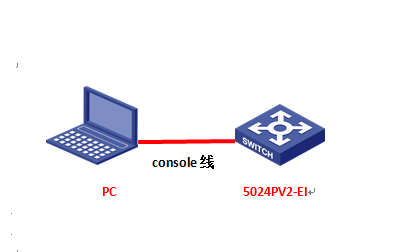
由於現場沒有網線,PC和S5024PV2-EI隻能使用串口線連接交換機的console互聯,交換機版本丟失,使用串口線導入S5024PV2-EI的軟件版本。
2 組網圖
配置步驟
3 配置步驟
3.1 升級前準備
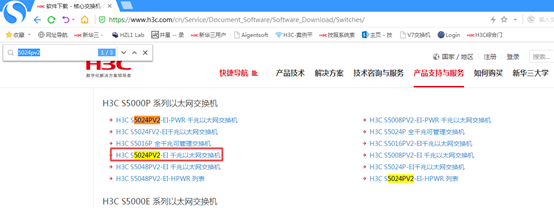
在官網下載S5024PV2-EI對應型號的軟件版本,點擊“產品支持於服務”---“軟件下載”---“交換機”,找到對應型號的軟件版本進行下載,下載賬號yx800,密碼01230123
3.2 重啟後按Ctrl+B進入bootrom界麵
重啟的時候按住Ctrl+B進入設備的bootroom菜單,以下標黑部分為設備自動打印部分,標紅加粗的命令是需要手動操作
System is starting...
Press Ctrl+D to access BASIC-BOOTWARE MENU
Booting Normal Extend BootWare
The Extend BootWare is self-decompressing..........................Done!
****************************************************************************
* *
* H3C S5024PV2-EI BootWare, Version 1.22 *
* *
***************************************************************************
Copyright (c) 2004-2017 New H3C Technologies Co., Ltd.
Compiled Date : Apr 14 2017 15:05:19
CPU Type : MIPS4kec
CPU L1 Cache : 16KB
CPU Clock Speed : 500MHz
Memory Type : DDR3 SDRAM
Memory Size : 128MB
Memory Speed : 300MHz
BootWare Size : 3MB
Flash Size : 32MB
BootWare Validating...
Press Ctrl+B to enter extended boot menu... //按Ctrl+B
BootWare password: Not required. Please press Enter to continue. //按ENTER
===========================<EXTEND-BOOTWAREMENU>=======================
|<1> Boot System |
|<2> Enter Serial SubMenu |
|<3> Enter Ethernet SubMenu |
|<4> File Control |
|<5> Restore to Factory Default Configuration |
|<6> Skip Current System Configuration |
|<7> BootWare Operation Menu |
|<8> Clear Super Password |
|<9> Storage Device Operation |
|<0> Reboot |
===========================================================================
Ctrl+Z: Access EXTEND-ASSISTANT MENU
Ctrl+F: Format File System
Ctrl+C: Display Copyright
Enter your choice(0-9): 2 //選擇2進入串口菜單
===========================<Enter Serial SubMenu>===========================
|Note:the operating device is flash |
|<1> Download Application Program To SDRAM And Run |
|<2> Update Main Application File |
|<3> Update Backup Application File |
|<4> Update Secure Application File |
|<5> Modify Serial Interface Parameter |
|<0> Exit To Main Menu |
===========================================================================
Enter your choice(0-5): 5 //選擇5修改串口參數
===============================<BAUDRATESET>=============================
|Note:'*'indicates the current baudrate |
| Change The HyperTerminal's Baudrate Accordingly |
|---------------------------<Baudrate Available>---------------------------|
|<1> 9600(Default)* |
|<2>19200 |
|<3>38400 |
|<4>57600 |
|<5>115200 |
|<0> Exit |
===========================================================================
Enter your choice(0-5): 5 //選擇5更換115200波特率
Baudrate has been changed to 115200 bps.
Please change the terminal's baudrate to 115200 bps, press ENTER when read
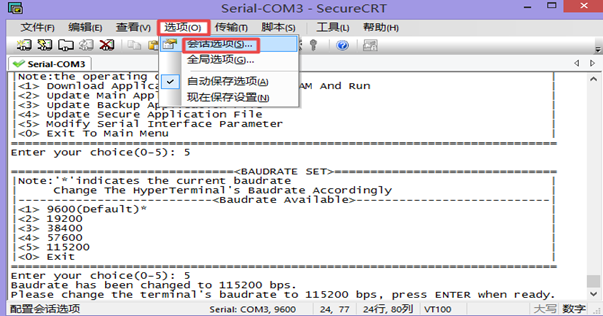
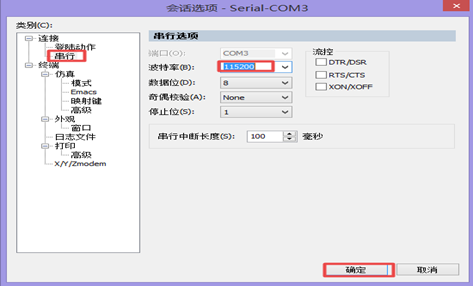
3.3 修改管理軟件波特率
修改管理軟件波特率波特率為115200,保持設備和管理軟件波特率一致,點擊“選項”—“會話選項”
重新進入到bootrom界麵,按0返回上級頁麵
==========================<BAUDRATESET>===============================
|Note:'*'indicates the current baudrate |
| Change The HyperTerminal's Baudrate Accordingly |
|---------------------------<Baudrate Available>---------------------------|
|<1> 9600(Default) |
|<2> 19200 |
|<3> 38400 |
|<4> 57600 |
|<5> 115200* |
|<0> Exit |
=========================================================================
Enter your choice(0-5): 0 //選擇0返回上一級
3.4 傳輸軟件版本
===========================<Enter Serial SubMenu>===========================
|Note:the operating device is flash |
|<1> Download Application Program To SDRAM And Run |
|<2> Update Main Application File |
|<3> Update Backup Application File |
|<4> Update Secure Application File |
|<5> Modify Serial Interface Parameter |
|<0> Exit To Main Menu |
=========================================================================
Enter your choice(0-5): 2 //選擇2上傳版本
Please Start To Transfer File, Press <Ctrl+C> To Exit.
Waiting ...CCCCCCCCCCCCCCCCCCCCCCCCC
點擊管理軟件中的“傳輸-“發送Xmodem”,選中版本存放路徑
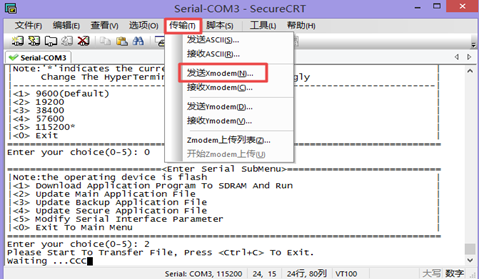
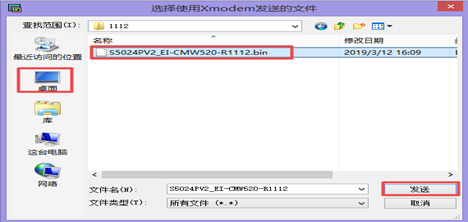
等待版本傳輸完成,按“0” 退回上級目錄

===========================<Enter Serial SubMenu>===========================
|Note:the operating device is flash |
|<1> Download Application Program To SDRAM And Run |
|<2> Update Main Application File |
|<3> Update Backup Application File |
|<4> Update Secure Application File |
|<5> Modify Serial Interface Parameter |
|<0> Exit To Main Menu |
=========================================================================
Enter your choice(0-5): 0 //選0返回上一級
=====================<EXTEND-BOOTWAREMENU>===========================
|<1> Boot System |
|<2> Enter Serial SubMenu |
|<3> Enter Ethernet SubMenu |
|<4> File Control |
|<5> Restore to Factory Default Configuration |
|<6> Skip Current System Configuration |
|<7> BootWare Operation Menu |
|<8> Clear Super Password |
|<9> Storage Device Operation |
|<0> Reboot |
=========================================================================
Ctrl+Z: Access EXTEND-ASSISTANT MENU
Ctrl+F: Format File System
Ctrl+C: Display Copyright
Enter your choice(0-9): 0 //選0重啟
4 實驗結果驗證
重啟後進入命令行,輸入dis version查看升級後版本
<H3C>dis version
H3C Comware Platform Software
Comware Software, Version 5.20.99, Release 1111
Copyright (c) 2004-2017 New H3C Technologies Co., Ltd. All rights reserved.
H3C S5024PV2-EI uptime is 0 week, 0 day, 0 hour, 0 minute
配置關鍵點
該案例暫時沒有網友評論
編輯評論
✖
案例意見反饋


親~登錄後才可以操作哦!
確定你的郵箱還未認證,請認證郵箱或綁定手機後進行當前操作