L1090雙機做出口負載案例
- 0關注
- 0收藏,1432瀏覽

最佳答案


防火牆設備上的關鍵配置(防火牆需要放通對應的安全策略,不再贅述):
#
interface Dialer1
ppp pap local-user test password cipher $c$3$HKrN4hJRbFiItP6JBbSKn6sjYufU8w==
dialer bundle enable
dialer-group 1
dialer timer idle 0
ip address ppp-negotiate
nat outbound
//先做撥號口的配置,在測試當中撥號口獲取的地址是20.0.0.1
#
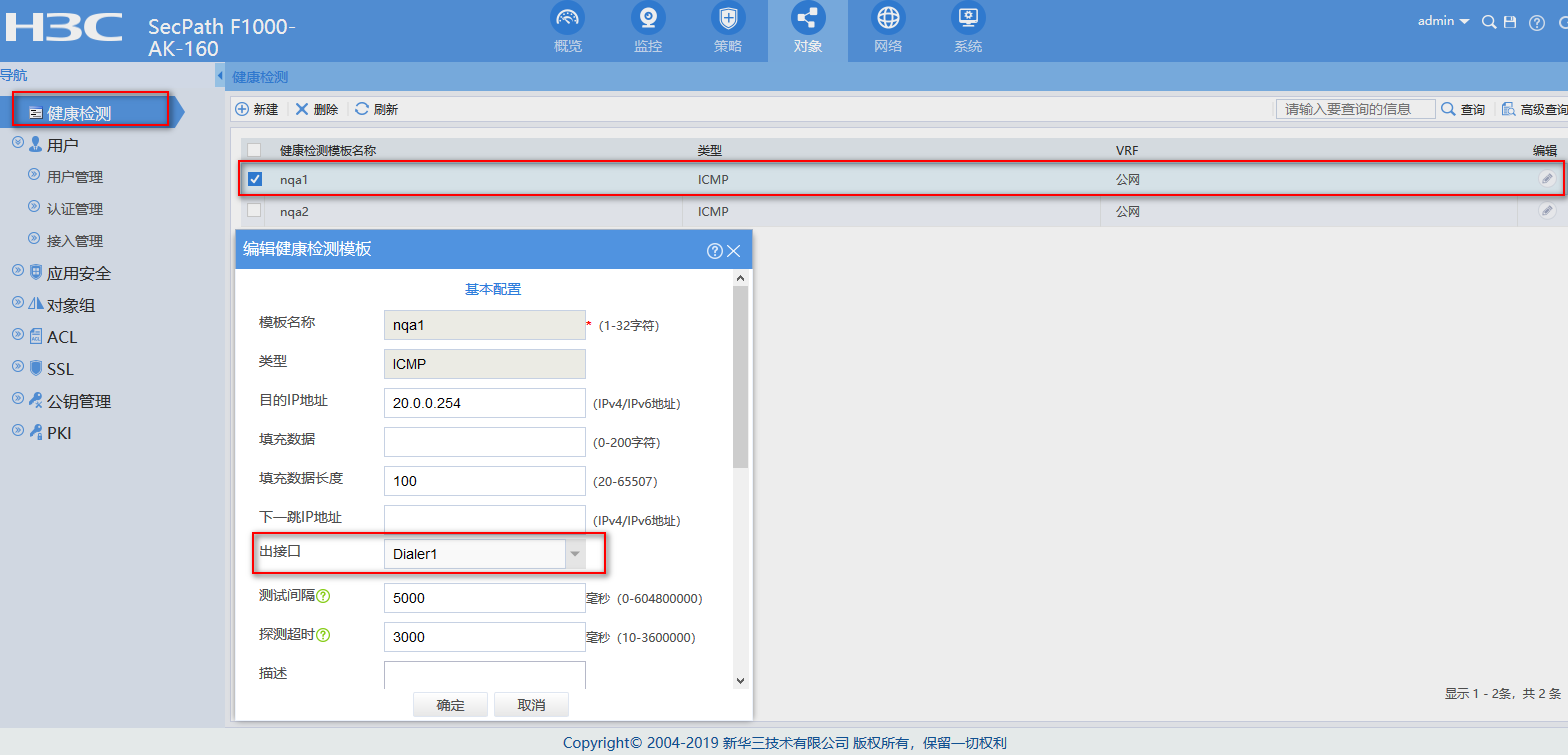
nqa template icmp nqa1
destination ip 20.0.0.254
out interface Dialer1
//創建PPPOE鏈路所用的ICMP健康性檢測模板,指定探測的出接口和目的地址,這個目的地址根據現場實際情況來定
#
nqa template icmp nqa2
//創建固定IP鏈路所用的ICMP健康性檢測模板,無須指定目的,會自動探測鏈路的router ip
#
interface GigabitEthernet2/0/1
port link-mode route
ip address A.A.A.A 255.255.255.0
//內網網關的配置,測試當中內網用戶網關地址為10.0.0.1,到時請根據實際情況配置
#
interface GigabitEthernet2/0/2
port link-mode route
pppoe-client dial-bundle-number 1 //撥號口綁定
#
interface GigabitEthernet2/0/3
port link-mode route
ip address B.B.B.B 255.255.255.0
nat outbound
//固定IP的鏈路配置,測試當中配置的是30.0.0.2,現網中請按照實際情況配置
#
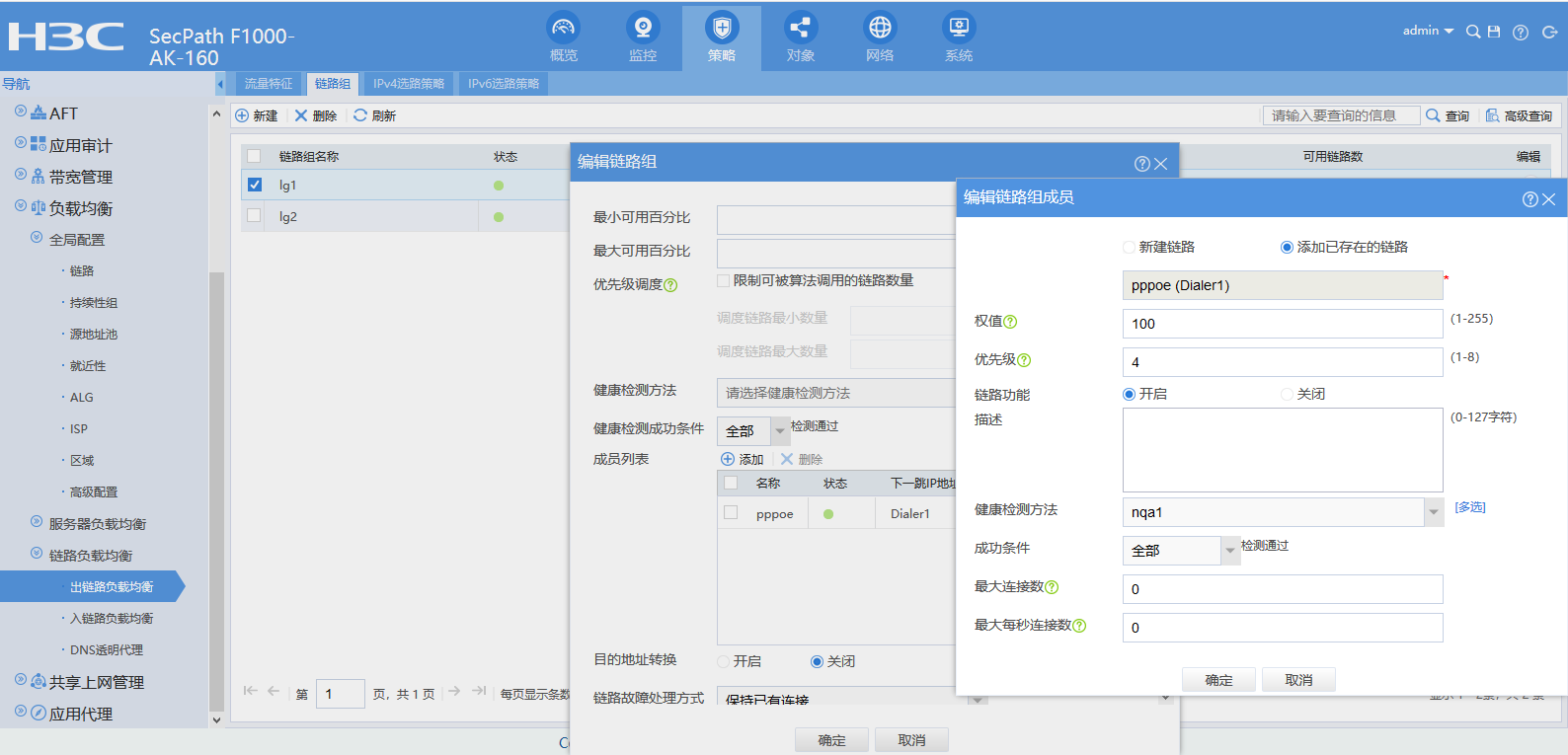
loadbalance link-group lg1
transparent enable
//創建鏈路組lg1,一定要記得關閉鏈路組當中的NAT轉換,也就是說要配置transparent enable命令
#
loadbalance link-group lg2
transparent enable //創建鏈路組lg2
#
loadbalance class pppoe type link-generic match-any
match 1 acl 3001 //創建負載均衡類,acl 3001
#
acl advanced 3001
rule 0 permit ip source 10.0.0.2 0
// acl 3001當中放通地址10.0.0.2,負載均衡類的配置要結合現場實際需求來做,此處隻是舉例。
#
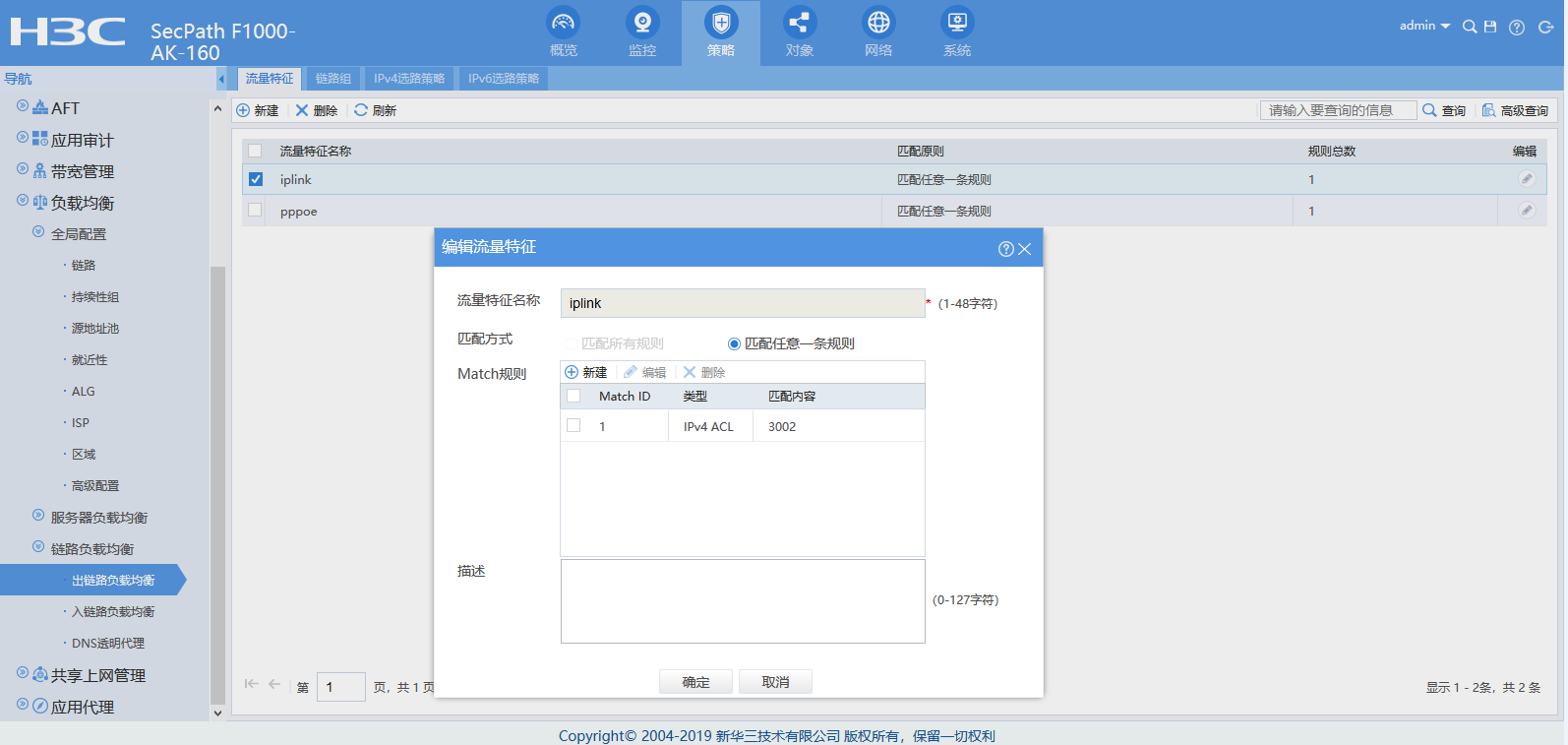
loadbalance class iplink type link-generic match-any
match 1 acl 3002 //創建負載均衡類,acl 3002
#
acl advanced 3002
rule 0 permit ip source 10.0.0.3 0
// acl 3002當中放通地址10.0.0.3,負載均衡類的配置要結合現場實際需求來做,此處隻是舉例。
#
loadbalance action pppoe type link-generic
link-group lg1 //創建負載均衡動作,讓流量走鏈路組lg1
#
loadbalance action iplink type link-generic
link-group lg2 //創建負載均衡動作,讓流量走鏈路組lg2
#
loadbalance policy test type link-generic
class pppoe action pppoe //讓class為pppoe的流量執行action為pppoe的負載均衡動作
class iplink action iplink //讓class為iplink的流量執行action為iplink的負載均衡動作
default-class action iplink //其他流量執行action為iplink的負載均衡動作
#
virtual-server test_pppoe type link-ip
virtual ip address 0.0.0.0 0
lb-policy test
service enable //創建虛服務,調用名為test的負載均衡策略
#
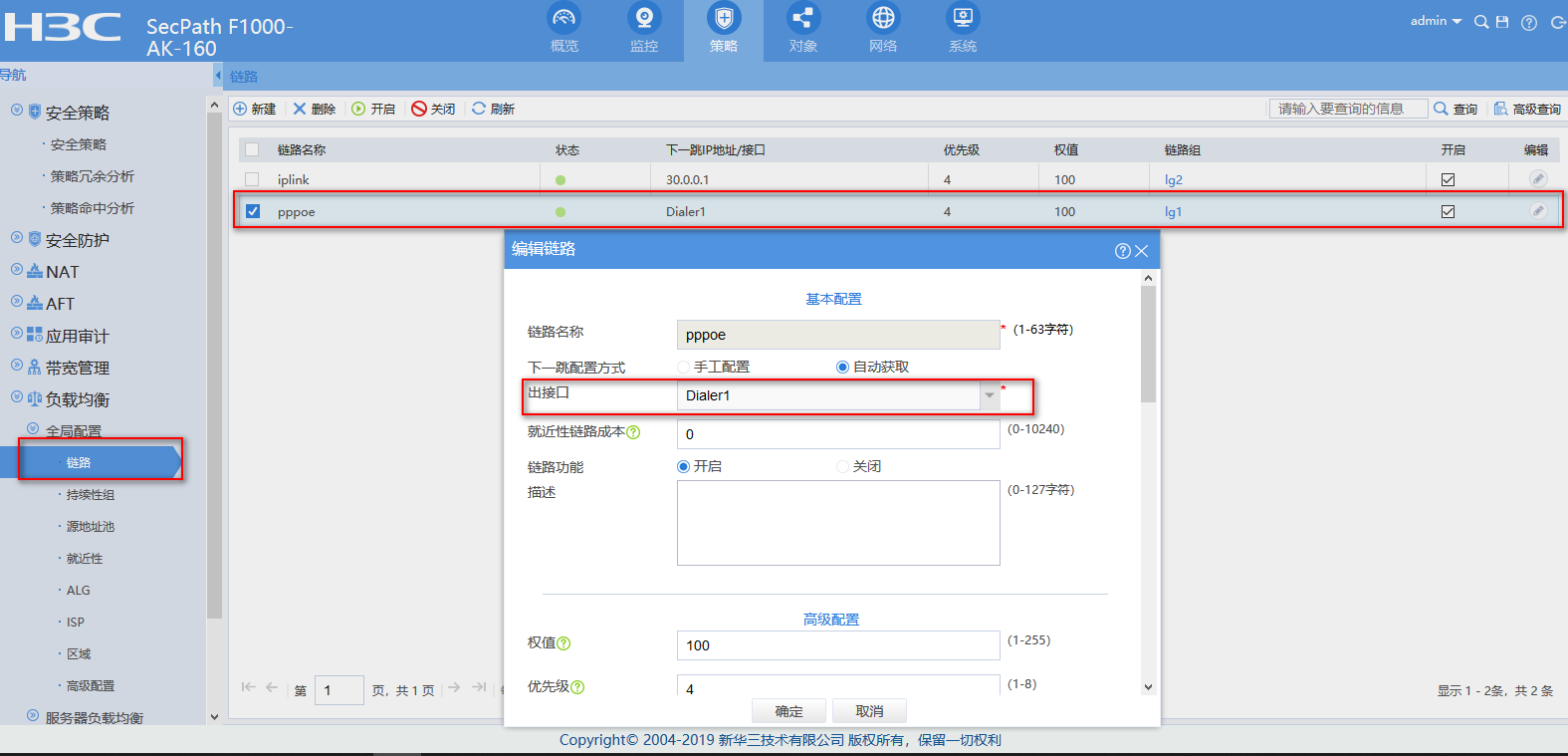
loadbalance link pppoe
router interface Dialer1
link-group lg1
probe nqa1
//創建鏈路pppoe屬於鏈路組lg1,出接口為dialer口,健康性檢測調用nqa1
#
loadbalance link iplink
router ip 30.0.0.1
link-group lg2
probe nqa2
//創建鏈路固定ip屬於鏈路組lg2,下一跳30.0.0.1,健康性檢測調用nqa2
#
關鍵配置的web界麵配置:
創建負載均衡類:

創建PPPOE鏈路健康性檢測模板:
創建固定IP鏈路:

創建PPPOE鏈路:
創建鏈路組:

配置完成之後可以通過會話信息測試:
當PC1的地址為10.0.0.2時,匹配acl 3001,會話信息如下:
Slot 2:
Initiator:
Source IP/port: 10.0.0.2/1
Destination IP/port: 40.0.0.2/2048
DS-Lite tunnel peer: -
VPN instance/VLAN ID/Inline ID: -/-/-
Protocol: ICMP(1)
Inbound interface: GigabitEthernet2/0/1
Source security zone: Trust
Responder:
Source IP/port: 40.0.0.2/2
Destination IP/port: 20.0.0.1/0 //nat outbound轉換成了pppoe的接口地址
DS-Lite tunnel peer: -
VPN instance/VLAN ID/Inline ID: -/-/-
Protocol: ICMP(1)
Inbound interface: Dialer1 //回包入接口是dialer口
Source security zone: dialer
State: ICMP_REPLY
Application: ICMP
Rule ID: 0
Rule name: pass
Start time: 2019-12-20 21:07:08 TTL: 25s
Initiator->Responder: 4 packets 240 bytes
Responder->Initiator: 4 packets 240 bytes //來回報文都有
當PC1的地址為10.0.0.2時,匹配acl 3001,會話信息如下:
Slot 2:
Initiator:
Source IP/port: 10.0.0.3/1
Destination IP/port: 40.0.0.2/2048
DS-Lite tunnel peer: -
VPN instance/VLAN ID/Inline ID: -/-/-
Protocol: ICMP(1)
Inbound interface: GigabitEthernet2/0/1
Source security zone: Trust
Responder:
Source IP/port: 40.0.0.2/26
Destination IP/port: 30.0.0.2/0 //NAT 轉換成了固定IP接口的地址
DS-Lite tunnel peer: -
VPN instance/VLAN ID/Inline ID: -/-/-
Protocol: ICMP(1)
Inbound interface: GigabitEthernet2/0/3 //回包入接口是固定IP地址接口
Source security zone: Untrust
State: ICMP_REPLY
Application: ICMP
Rule ID: 0
Rule name: pass
Start time: 2019-12-20 21:06:15 TTL: 23s
Initiator->Responder: 4 packets 240 bytes
Responder->Initiator: 4 packets 240 bytes
- 2024-12-26回答
- 評論(0)
- 舉報
-
(0)
暫無評論
編輯答案


親~登錄後才可以操作哦!
確定你的郵箱還未認證,請認證郵箱或綁定手機後進行當前操作
舉報
×
侵犯我的權益
×
侵犯了我企業的權益
×
- 1. 您舉報的內容是什麼?(請在郵件中列出您舉報的內容和鏈接地址)
- 2. 您是誰?(身份證明材料,可以是身份證或護照等證件)
- 3. 是哪家企業?(營業執照,單位登記證明等證件)
- 4. 您與該企業的關係是?(您是企業法人或被授權人,需提供企業委托授權書)
抄襲了我的內容
×
原文鏈接或出處
誹謗我
×
- 1. 您舉報的內容以及侵犯了您什麼權益?(請在郵件中列出您舉報的內容、鏈接地址,並給出簡短的說明)
- 2. 您是誰?(身份證明材料,可以是身份證或護照等證件)
對根叔社區有害的內容
×
不規範轉載
×
舉報說明
暫無評論