wa5320-c可以做mesh嗎?有對應案例嗎或者文檔
- 0關注
- 0收藏,1564瀏覽

最佳答案


可以的 ,參考文檔
//www.yolosolive.com/cn/Service/Document_Software/Document_Center/Home/Wlan/00-Public/Configure/FAT_AP/H3C_CG(R2436)/09/?CHID=518246
- 2024-01-17回答
- 評論(0)
- 舉報
-
(0)
暫無評論

您好,請知:
wa5320-c可以做mesh
以下是配置案例,請參考:
1.12 WLAN Mesh典型配置舉例
1.12.1 Mesh網絡基本組網配置舉例
1. 組網需求
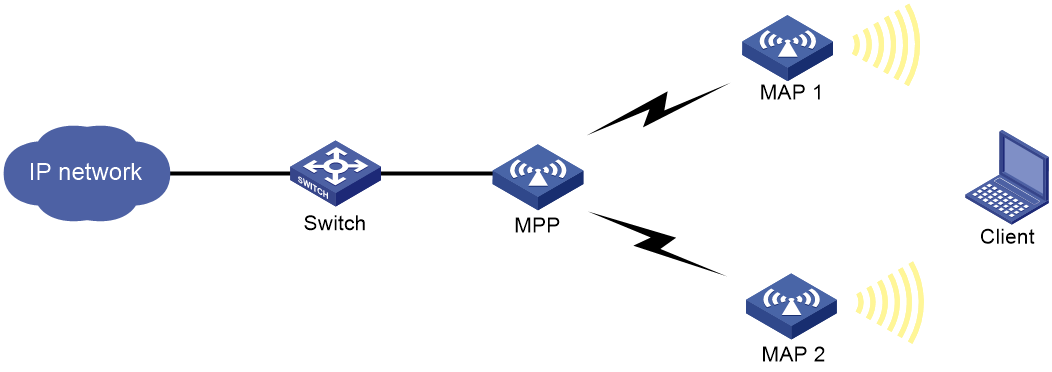
如圖1-8所示,要求使用FAT AP組建一個Mesh網絡,在MPP和MAP 1、MPP和MAP 2之間使用射頻工作模式為802.11n(5GHz),工作信道號為149來建立Mesh鏈路,客戶端能夠通過MAP接入網絡並訪問網絡資源。
2. 組網圖
圖1-8 Mesh網絡基本組網圖
3. 配置步驟
(1) 配置MPP
# 創建一個編號為1的Mesh Profile。
<MPP> system-view
[MPP] wlan mesh-profile 1
# 配置Mesh ID為1。
[MPP-wlan-mesh-profile-1] mesh-id 1
# 配置認證模式為SAE。
[MPP-wlan-mesh-profile-1] akm mode sae
# 配置預共享密鑰為12345678。
[MPP-wlan-mesh-profile-1] preshared-key pass-phrase simple 12345678
# 開啟Mesh Profile。
[MPP-wlan-mesh-profile-1] mesh-profile enable
[MPP-wlan-mesh-profile-1] quit
# 將Mesh Profile 1綁定到MPP的WLAN-Radio 1/0/1接口。
[MPP] interface wlan-radio 1/0/1
[MPP-WLAN-Radio1/0/1] mesh-profile 1
# 配置Radio接口類型為dot11n(5GHz)。
[MPP-WLAN-Radio1/0/1] type dot11an
# 配置射頻工作信道號為149。
[MPP-WLAN-Radio1/0/1] channel 149
# 開啟射頻功能。
[MPP-WLAN-Radio1/0/1] undo shutdown
[MPP-WLAN-Radio1/0/1] quit
(2) 配置MAP 1
# 創建一個編號為1的Mesh Profile。
<MAP1> system-view
[MAP1] wlan mesh-profile 1
# 配置Mesh ID為1。
[MAP1-wlan-mesh-profile-1] mesh-id 1
# 配置認證模式為SAE。
[MAP1-wlan-mesh-profile-1] akm mode sae
# 配置預共享密鑰為12345678。
[MAP1-wlan-mesh-profile-1] preshared-key pass-phrase simple 12345678
# 開啟Mesh Profile。
[MAP1-wlan-mesh-profile-1] mesh-profile enable
[MAP 1-wlan-mesh-profile-1] quit
# 配置無線服務模板service1,配置SSID為mesh-network,並使能服務模板。
[MAP1] wlan service-template service1
[MAP1-wlan-st-service1] ssid mesh-network
[MAP1-wlan-st-service1] service-template enable
[MAP1-wlan-st-service1] quit
# 將Mesh Profile 1綁定到MAP 1的WLAN-Radio 1/0/1接口。
[MAP1] interface wlan-radio 1/0/1
[MAP1-WLAN-Radio1/0/1] mesh-profile 1
# 將無線服務模板service1綁定到MAP 1的WLAN-Radio 1/0/1接口。
[MAP1-WLAN-Radio1/0/1] service-template service1
# 配置Radio接口類型為dot11n(5GHz)。
[MAP1-WLAN-Radio1/0/1] type dot11an
# 配置射頻工作信道號為149。
[MAP1-WLAN-Radio1/0/1] channel 149
# 向MAP1的鄰居白名單中添加MPP上WLAN-Radio 1/0/1接口的MAC地址,使MAP1僅與MPP建立Mesh連接,以避免環路的產生。
[MAP1-WLAN-Radio1/0/1] mesh peer-mac-address 4a1b-517d-23ff
# 開啟射頻功能。
[MAP1-WLAN-Radio1/0/1] undo shutdown
[MAP1-WLAN-Radio1/0/1] quit
[MAP1] quit
(3) 配置MAP 2
# MAP 2的配置和MAP 1的配置相同,此處不再贅述。
- 2024-01-17回答
- 評論(0)
- 舉報
-
(0)
暫無評論
編輯答案


親~登錄後才可以操作哦!
確定你的郵箱還未認證,請認證郵箱或綁定手機後進行當前操作
舉報
×
侵犯我的權益
×
侵犯了我企業的權益
×
- 1. 您舉報的內容是什麼?(請在郵件中列出您舉報的內容和鏈接地址)
- 2. 您是誰?(身份證明材料,可以是身份證或護照等證件)
- 3. 是哪家企業?(營業執照,單位登記證明等證件)
- 4. 您與該企業的關係是?(您是企業法人或被授權人,需提供企業委托授權書)
抄襲了我的內容
×
原文鏈接或出處
誹謗我
×
- 1. 您舉報的內容以及侵犯了您什麼權益?(請在郵件中列出您舉報的內容、鏈接地址,並給出簡短的說明)
- 2. 您是誰?(身份證明材料,可以是身份證或護照等證件)
對根叔社區有害的內容
×
不規範轉載
×
舉報說明
暫無評論